
Inbox
The Inbox lists everything waiting on you: an agent’s question, permission request, secret, Operations approval, review, result or task for a person, and the Problems SAM files itself when something of yours fails. You answer from the Inbox instead of opening each chat. It replaced the notification bell panel and the project Notifications page.
Open the Inbox
Section titled “Open the Inbox”- Across every project: Inbox in the main navigation, or the inbox icon at the top of the navigation (on a desktop) or in the app bar (on a phone). Its number counts the items you can act on in every project.
- For one project: Inbox in the project’s navigation, under Chat. Its number counts that project only. The project’s Overview, where a project opens, shows the first items under Needs you; opening one there and going Back returns you to the Overview.
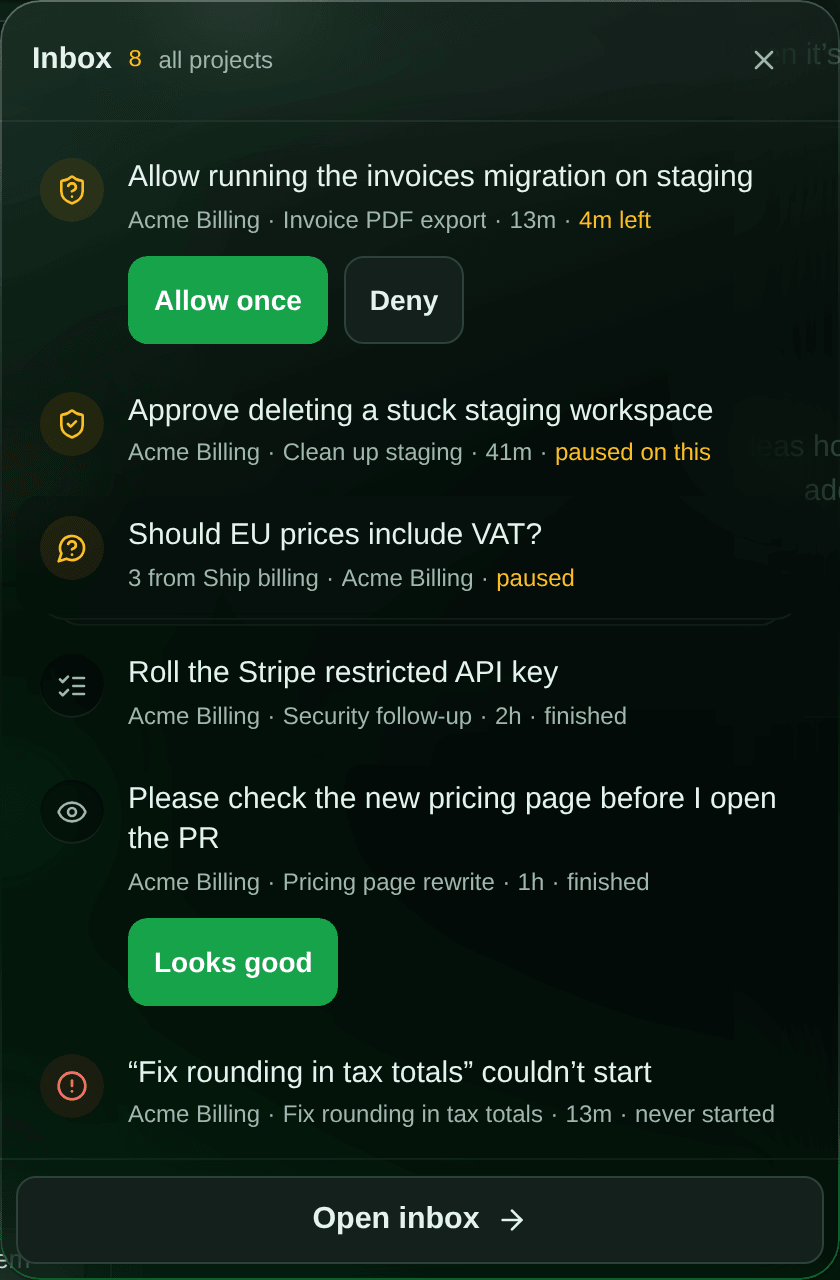
On a desktop the inbox icon opens a quick view of the first items. Where one tap is safe it offers the answer right there: Allow / Deny for a permission (never “always allow”), the options of a question with three or fewer short options, Looks good for a review and Got it for a result. Anything else opens the item on the Inbox page; Open inbox opens the page. On a phone the icon opens the page.
The list
Section titled “The list”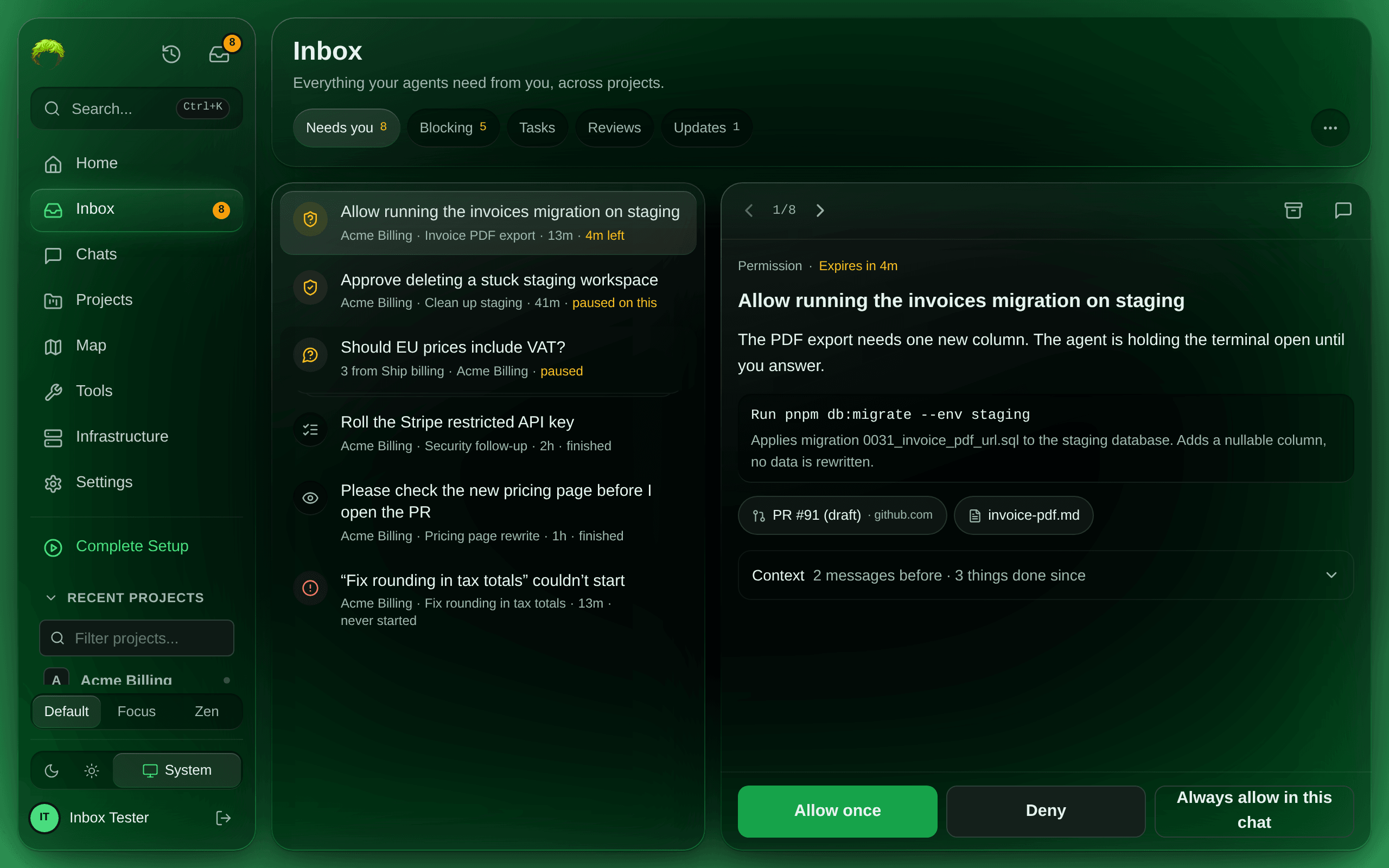
Each row is the ask in one sentence, then the project (in the cross-project Inbox), the chat, how long ago, and what the agent is doing: paused on this in amber when it is stopped waiting for you, or still working, finished or never started. A permission with a deadline shows the time left instead. Several asks from one chat are stacked: the row says 3 from the chat.
The order is: items with a live deadline first, then the ones an agent is stopped on, oldest first, then the rest, oldest first.
The chips filter the list: Needs you (everything you can act on), Blocking (agents stopped on you), Tasks, Reviews, and Updates. Results have no chip of their own: they are under Needs you. Updates holds the notifications that are not asks: finished tasks, pull requests, mentions, comments, shared chats and failures. Selecting one marks it read and opens it. Archived, in the ⋯ menu, lists what you archived.
Answer an item
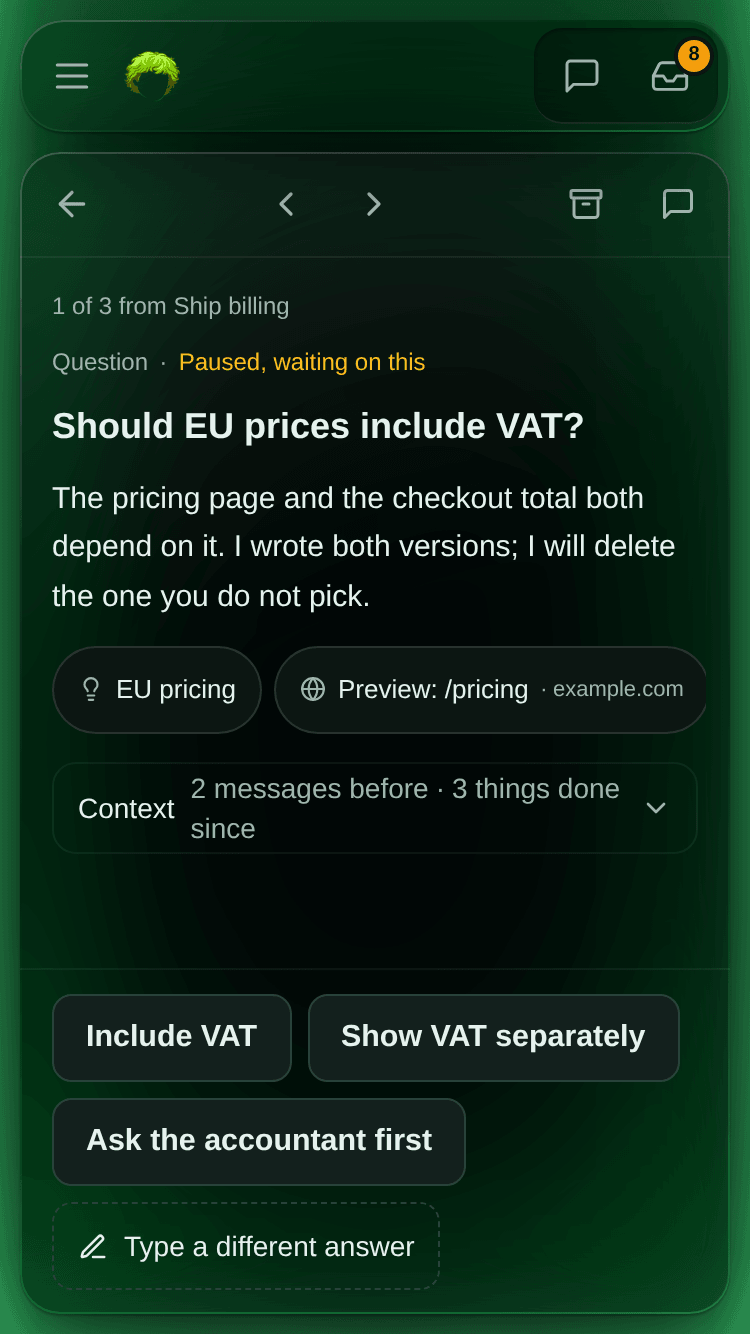
Section titled “Answer an item”On a phone, select a row to open the item full screen; ‹ and › step to the previous and next item. On a desktop the open item sits beside the list.
The item reads as a conversation with the agent. Its first message is the ask: the kind and the agent’s state, the ask, the agent’s reason, links to the ideas, files or pull requests it mentioned, and Context (the messages before the ask and what the agent has done since). The answer controls sit inside that message. Your replies and the agent’s responses follow in time order, and once the agent responds the controls move to its latest response, so there is only one set. Show more of the conversation reads earlier replies and later responses. The chat composer is pinned at the bottom (Reply to an item).
The answer controls by kind:
| Kind | Answer |
|---|---|
| Question | One of the agent’s options. With more than five options they become a list with one Send button. A typed answer is a reply in the composer. |
| Permission | The exact options the agent’s tool offered, such as Allow once, Always allow in this chat or Deny. The command it wants to run is shown above them. |
| Secret | The secure value field; it is saved encrypted and never shown to the agent (details). Decline says you will not supply it. |
| Approval | Approve or Deny (superadmins, Operations project). |
| Review | Looks good. Anything more is a reply in the composer. |
| Result | Got it closes it without waking the agent. Anything more is a reply in the composer. |
| Task | Read-only in the Inbox for now: the task’s title, why a person is needed, its steps and links. Archive closes it. See Tasks for people. |
| Problem | The fix for what failed, such as Retry or Wake the chat. See Problems SAM files for you. |
| Form, Sign-in link | Answered in the chat: the item says This request is answered in its chat. with an Answer in chat button. |
After you answer, a one-line receipt confirms what was sent and the next item opens. Answering the last item of a stack moves on to the next stack; answering the last item leaves an empty Inbox. If the item was answered somewhere else meanwhile (in the chat card, another tab or by a teammate), it closes by itself. If sending fails, the item stays open with the error.
Open chat (the speech bubble at the top) opens the conversation the ask came from. An answer given in the chat card is the same answer, so the Inbox catches up.
What agents file
Section titled “What agents file”Agents file items with their inbox_write tool, and read what is already open with inbox_read
(apps/api/src/routes/mcp/inbox-tools.ts, over packages/operations/src/inbox-agent-core.ts).
Every session is told that nobody reads its chat: you see only what the agent puts in your inbox
(apps/api/src/routes/mcp/instruction-inbox-guidance.ts). So an agent files the answer or finished
work you asked for as a result, something to check as a review, and a decision it needs as an ask.
A question or an answer left only in the chat reaches nobody. Agents are also told to file only what
is worth your time and to write each item like a short note to a colleague in clear, simple
language: a one-sentence title with the outcome or the ask, then brief, easy-to-read context in
markdown (short paragraphs, bullet lists, bold for what matters), without IDs or jargon. The Inbox
and the chat card show that context as formatted text; the push notification shows it plain. A routine run with nothing for you, or work another agent
handed out (which reports back to that agent), files nothing. SAM files nothing on an agent’s
behalf; the only items SAM files itself are Problems.
The tools need a session started from a task or a project chat, as request_human_input always did;
a chat opened directly on a workspace has no inbox to file into.
- Ask (
ask): one question with one way to answer it: options, free text, or Yes / No. A blocking ask means the agent is stopped until you answer: the chat shows paused on this, you get a push, and it expires on the question schedule in Admin settings. A non-blocking ask lets the agent keep working and never expires.request_human_inputfiles a blocking ask. - Review (
review): something the agent wants you to evaluate, such as a pull request or a preview. Answer Looks good or reply. It never expires. - Result (
result): what you asked for, such as the answer to a question, a finding, or work that is done. The title is the outcome and the details follow. Got it closes it and leaves the agent alone; a reply wakes the agent’s chat with your reply. The reply endpoint follows the same access and wake rules as sending a message in its chat, including a sleeping agent. It never blocks the agent and never expires. You get a push titled Result ready that opens the item. - Task (
assign): work only a person can do, such as adding a production secret or deciding a price. It never blocks the agent and never expires; a soft due date only sorts and highlights it. See Tasks for people. - The agent may edit the wording or links of its own open item, or withdraw it when it is no longer
needed (
cancel, with a reason). A withdrawn item leaves your inbox and the agent is not told anything new.
Each item carries a one-sentence title, the agent’s context (markdown), and links to ideas, Library files, policies, knowledge, other chats, pull requests of the project’s repository, or previews of its workspaces. Each link is checked to belong to the project when the item is filed, and opens with your own access. A Library file opens in a preview over the Inbox rather than on the Library page: close it (the x, Escape, or Back on a phone) and you are back on the item, with anything you had typed still there. Open in Library in the preview’s header goes to the file in the Library. Library links in chat messages, idea pages, the Comments page and workflow outputs open the same way.
Related items from one chat share a group and stack together. When an agent files an item that looks like one already open (same group, or a title with most words in common), it is shown the open one so it can point you there instead of filing a duplicate.
An item you answer in the chat card or in the Inbox is the same record: answering either closes
both, and the agent is woken in its chat with your answer. Got it on a result is the exception:
there is nothing for the agent to do, so its chat is not woken (answerAsk,
packages/operations/src/inbox-write-core.ts).
Reply to an item
Section titled “Reply to an item”Every item with a chat behind it has the project chat’s own composer at the bottom: type, attach files, dictate, or paste. Send puts your message in the agent’s chat with a pointer to the item, and a receipt says Sent to the agent’s chat. This comes back if it responds. The item then leaves Needs you. In the agent’s chat your message carries a small Re: chip naming the item; select it to open the item. On a pending permission the composer says Sending declines this request before you send: your message goes to the agent as the reason. A permission you declined this way keeps its conversation, without the permission buttons, and you can still reply to it.
In the list, an item that came back shows a green dot and The agent responded, with who replied. Items still with the agent are listed under Archived with a With the agent label.
Replies and the agent’s response
Section titled “Replies and the agent’s response”A reply sends your message and attachments to the item’s source chat. The agent receives the item reference and decides whether your message answers the ask, needs a response, or changes the ask. Your chat transcript keeps your original message; the item guidance is delivered only to the agent.
While your reply is with the agent, the open item leaves Needs you and Blocking and appears in Archived with who replied. A team item leaves everyone’s inbox. This does not close the ask, decline a secret request, or approve an Operations action. Replying to a pending permission does decline that permission first, so the agent can read your message.
An agent uses inbox_write method respond with ref and body to respond on that item, or
update to change its ask. The agent passes replyMessageId from the received SAM header, so
any other queued reply stays with the agent until it handles that reply too. With no outstanding
replies, ordinary responses and updates need no message id. Method resolve treats the observed reply
as the answer to a question, review or result and keeps it out of your inbox. It requires that
message id and refuses while another reply is outstanding. It cannot resolve
secrets, Operations approvals or tasks assigned to people. If the agent carries on without acting
on the reply, the item stays with the agent, including after its task finishes. It should never
file a duplicate item for the same conversation. An agent must handle outstanding replies before
withdrawing the item with cancel. A response on a system error linked to the source chat
brings it back without closing the error.
A failed or expired delivery does not bring the item back. Sending the reply again explicitly creates a new delivery; expiry does not prove the earlier message was never received. If acceptance was interrupted before a canonical message exists, an explicit retry resumes the same delivery id. Concurrent attempts are deduplicated, and a conflicting receipt is rejected. If delivery remains ambiguous, inspect the source chat before sending again.
The composer posts to POST /api/projects/:projectId/inbox/items/:ref/reply
(InboxReplyComposer, apps/web/src/components/inbox/InboxReplyComposer.tsx).
Tasks for people
Section titled “Tasks for people”Only an agent can assign a task today. To hand work to a teammate, ask the agent in its chat, for example “assign adding the Stripe production key to Ana”, or “give the pricing decision to the team”. The teammate gets a Task row in their Inbox and a push.
If you were given a task
Section titled “If you were given a task”The task opens in your Inbox like any item: its title, why a person is needed, its steps and links, and the chat it came from. In the app today a task is read-only, so finishing it takes a message:
- Do the work.
- Tell the agent it’s done. If you can write in the chat the task came from (you started it, or it was shared with you), select Open chat (the speech bubble at the top) and say so, for example “done, the key is in the production environment”. Otherwise tell the person who started that chat, or comment on the task through the API: a comment from the assignee wakes the agent.
- Leave the task open until the agent has picked it up. Archive it once the agent knows, or if you won’t do it. Archiving tells the agent nothing, so if it should stop waiting, say so in the chat or comment on the task first.
Controls for ticking steps, commenting, marking it done, handing it on and I’ll take it come with the task view in the next release; until then they are available through the API.
How tasks work
Section titled “How tasks work”An agent assigns a task to one project member or to the team, with a one-sentence title, why a person is needed, optional steps and links. The member must be an active member of the project; anyone else is refused when the task is assigned and when it is handed on. The agent keeps working, and its chat watches the task. A team task is listed for every member until one of you takes it: from then on it is theirs, and it no longer counts as waiting on the others. Members whose role cannot write tasks (viewers) can read a task and comment on it, nothing more.
The agent that assigned the task is woken in its chat when you comment, take it, hand it on, mark it
done or reopen it. Archiving it wakes no one. Ticking steps is recorded and does not wake it unless it asked for
that. A comment wakes it only when it comes from the assignee, the member who took the task, or
someone who can write in the agent’s chat; anyone else’s comment is kept, and the agent reads it the
next time it wakes.
A comment from someone other than the chat’s owner reaches the agent as a teammate’s input, not as
an instruction from the owner. Another chat of the same person can watch the task instead of
assigning a duplicate (attach); it is woken when the task is taken, handed on, finished or
reopened, and reads the comments at those wakes.
A teammate who cannot read the agent’s chat still sees the task, its steps, links and discussion,
never the chat transcript. Task discussion also appears on the project’s Comments page for the
people who can read the task; for everyone else it neither takes a place on the page nor counts in
its total (listProjectCommentInbox, packages/project-data/src/do/project-comment-inbox.ts).
If you leave the project, your open tasks go to the team and the agent is told. If the agent’s chat is archived or its work has finished, the task stays open for you; the
changes are recorded but no longer wake that chat.
Implementation: assignAgentTask (packages/operations/src/inbox-agent-tasks.ts), the task
operations in packages/operations/src/inbox-task-core.ts, and comment wakes in
decideInboxTaskCommentWake (apps/api/src/services/agent-wake-authorization.ts).
Limits are in Admin settings: open tasks per chat
(inbox.openTasksPerChat), steps per task (inbox.taskStepsMax), chats watching one task
(inbox.watchersPerItemMax), activity rows shown (inbox.taskActivityMax), and how long a finished
task still wakes its watching chats, so a reopen reaches them (inbox.closedTaskWatchHours).
Problems SAM files for you
Section titled “Problems SAM files for you”When something of yours fails, SAM files a Problem item for you itself, with the fix as its
button (packages/operations/src/inbox-error-core.ts, apps/api/src/services/inbox/system-errors.ts):
| What failed | Example title | Buttons |
|---|---|---|
| A task failed to start or stopped before finishing | “Fix login” couldn’t start | Retry (when available), Open chat |
| A chat couldn’t wake | Couldn’t wake “Ship billing” | Wake the chat (VM chats), Open chat |
| A chat went to sleep without a fresh snapshot, so work may be lost | “Ship billing” went to sleep without saving its latest work | Open chat |
| An automation keeps failing, or SAM paused it | Automation “Nightly deps” was paused after 3 failed runs | Resume when paused, otherwise none |
| Your answer to an agent was never confirmed delivered | Your answer didn’t reach the agent in “Ship billing” | Open chat |
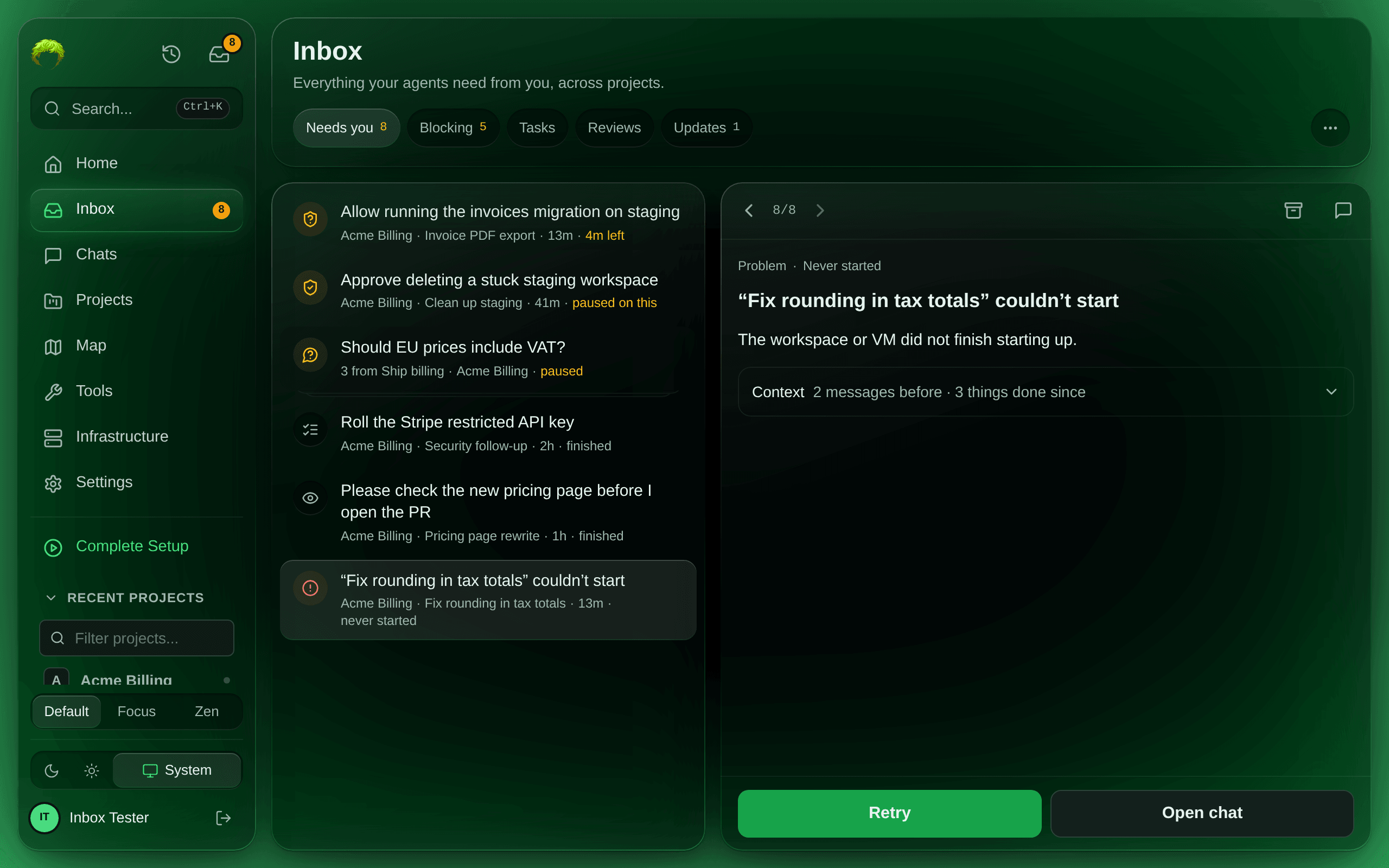
Retry starts the task again from its original request right away, in a new chat and workspace; it does not continue the failed chat. To keep the work the chat already did, use Open chat and reply there (see When a task fails). Retry is offered only when the failure can be retried and you own the project, and Wake the chat only for VM chats: an Instant chat wakes when you reply in it.
A task you stop yourself, or one that ends normally, files nothing. A failed task gets its item within about five minutes. If the same thing fails again, the open item is updated instead of a new one filed. When it recovers (the task is retried, the chat wakes, the automation runs), the item closes by itself. An item you archived stays archived while the thing keeps failing.
Archive
Section titled “Archive”Archive (the box at the top) means you will not act on the item: it leaves your inbox, and no
agent is told. The agent stays where it is until you answer something or write in its chat.
Archiving a question also keeps SAM’s automatic check-ins off that chat until you write in it (for
up to inbox.archiveCheckinHoldHours, a week by default), so nothing nudges the agent.
- A question, review, result or task closes.
- A secret request closes as declined and an approval as denied, without telling the agent.
- A permission request leaves your inbox but is not answered: it stays pending in its chat, where you can still answer it, and the agent keeps waiting until it gives up on it.
- A Problem has no agent to tell.
For a few seconds the receipt offers Undo; nothing is sent until that time is up. If you leave the page or close the tab first, the archive is sent then.
How it stays up to date
Section titled “How it stays up to date”The Inbox reads the record each ask lives in; it keeps no copy. It refreshes when you open it, when you come back to the tab, and when a new notification arrives over the app’s live connection. Web Push and notification preferences work as before.
If a permission decision changes before the queued reply can decline it, that delivery fails with an inspectable conflict. SAM does not retry the conflicting decision or automatically resurface the item. Inspect the chat before sending another reply.
Agent responses and updates return withAgent. When true, other replies remain outstanding: inbox_read method get on the item returns the source chat’s canonical conversation and pendingReplyIds visible on that page. Follow replyCursor / responseCursor with the returned conversation cursors to read more, including earlier failed deliveries. Reading acknowledges nothing; handle each observed reply explicitly before resolving the ask. Other chats’ existing item reads do not expose the source conversation.
Conversation pagination reads both streams initially. On continuation, supply only non-null returned cursors: replyCursor advances replies and responseCursor advances responses. An omitted stream is skipped on that continuation, preventing already-exhausted replies or responses from restarting. hasMore covers the streams requested in that call.