
App Deployments
SAM app deployments are agent-first. A user creates a deployment environment and enables agent deployment for that environment. An agent then targets that named environment when it publishes a release.
Agents can discover this whole flow at runtime by calling the get_deployment_guide MCP tool, which returns a briefing on the agent-first model and the order in which to call the deployment tools. It takes no arguments and is the recommended starting point whenever a user asks to deploy, launch, publish, ship, or release an app.
Publishing is a two-step, asynchronous flow:
build_and_publish(environment, reference?, workingDir?)starts a build/publish job on the SAM VM and immediately returns a durablepublishJobId. The job builds the workspace’s Docker Compose stack, pushes built service images with SAM-owned registry credentials, and records the release server-side. Agents never run docker or registry commands and never receive registry credentials.get_publish_status(publishJobId)reports progress. Poll it until the status is terminal —succeeded,failed,canceled, orunknown— rather than retryingbuild_and_publishblindly.
After a successful publish, agents can verify runtime health with read_deployment_logs(environment, ...).
build_and_publish requires the named deployment environment to be active — or in error, awaiting a recovery release — agent deployment to be enabled by a user, and the agent profile to satisfy that environment’s policy. An environment that a previous release left in error stays available to agents precisely so the next release can recover it; environments that are starting, stopping, stopped, or being deleted are not agent-deployable.
Agents can preview route behavior before publishing with preview_deployment_routes(environment, composeYaml) and inspect the latest release’s generated routes and custom domains with list_deployment_routes(environment).
The release submission format is Docker Compose YAML with SAM extensions. SAM supports multi-service Compose stacks, preserves service topology including Docker Model Runner provider: services, and derives route hints from either x-sam-routes or compose service ports:. Compose long-syntax ports: entries with mode: host are treated as internal/private route hints; other ports: entries are public by default unless an explicit private x-sam-routes entry suppresses them.
services:  web:    image: registry.example.com/my-project/web:v1.2.3    environment:      NODE_ENV: ${NODE_ENV:-production}      PUBLIC_APP_DOMAIN: ${PUBLIC_APP_DOMAIN}      DATABASE_URL: ${DATABASE_URL}    healthcheck:      test: ['CMD', 'curl', '-f', 'http://localhost:3000/health']      interval: 30s      timeout: 5s      retries: 3    deploy:      resources:        limits:          cpus: '0.50'          memory: 512M
x-sam-routes:  - service: web    port: 3000    mode: public
CPU and memory limits drive deployment placement. SAM sums the limits across services, reuses an
allowed deployment node when the aggregate reservation fits, and otherwise provisions the smallest
sufficient allowed offering. When a service omits the whole deploy.resources block, configurable
per-service CPU and memory defaults apply. If the block declares only one limit, Compose parsing uses
its compatibility fallback for the other limit (1 CPU or 512 MB). Placement also reserves a
configurable root-disk allowance per service and adds x-sam-size-hint-mb from named volumes.
Submit the file to the release endpoint with a YAML content type:
POST /api/projects/:projectId/environments/:envId/releasesContent-Type: text/yamlSAM accepts application/yaml, text/yaml, application/x-yaml, and text/x-yaml. Raw manifest JSON is still accepted for older callers, but Compose YAML is the authoring format.
Configure values on each deployment environment from the Deployments page:
- Variables are visible after save. SAM supplies them to
build_and_publishand to deployment-node Compose apply commands, so they can be used for image tags, build args, domains, and runtime environment values. - Secrets are hidden after save. SAM supplies them only to deployment-node Compose apply commands as process environment for Compose interpolation. Secrets are not sent to build nodes and should not be used in build args, image tags, route fields, or other build/publish-control fields.
Compose interpolation only affects placeholders such as ${DATABASE_URL}. It does not override literal Compose values like NODE_ENV: production.
x-sam-secret and older explicit secret references remain supported for compatibility, but new deployments should prefer normal Compose ${VAR} placeholders backed by per-environment Variables and Secrets.
For compose-publish releases, build_and_publish supports safe named Docker Compose volumes when each service mount references a top-level named volume declaration. SAM creates missing provider-backed block volumes for those declarations and rewrites service mounts to SAM-managed volume roots before deployment apply. Host bind mounts, Docker socket mounts, anonymous volumes, undeclared named volumes, volumes_from, tmpfs, external volumes, custom volume drivers, and driver options are rejected.
services:  web:    image: registry.example.com/my-project/web:v1.2.3    volumes:      - data:/app/data
volumes:  data:    x-sam-size-hint-mb: 2048
Use mode: host for service ports such as databases, queues, and workers that should be reachable only inside the deployed Compose stack/private network. Public web/API entrypoints should use normal ports: entries or explicit public x-sam-routes.
If an app needs to know its public hostname before it starts, agents should preview routes before publishing and then write the returned URLs into deployment configuration. Common examples are Django ALLOWED_HOSTS / CSRF trusted origins, CORS origins, OAuth callback URLs, webhook callback URLs, and canonical app URL variables.
Persistent volumes
Section titled “Persistent volumes”Provider-backed block volumes give a deployment environment durable storage that survives container restarts and the stop/start lifecycle. They are real cloud block volumes created through the deployment environment’s provider and attached to the deployment node.
- Volumes are created automatically from safe Compose named volume declarations during
build_and_publish, and can also be created, viewed, attached, detached, and deleted from the deployment environment’s Volumes tab. - Each volume is mounted at a SAM-managed path derived from the environment id, and the deployment apply payload tells the node which provider volume to mount where.
- All volumes in one environment must share the same provider and the same location. A single VM can only attach volumes that live in its own provider/location, so an environment that mixes providers or regions is rejected before a node is provisioned.
- When an environment has volumes (or is marked as requiring volumes), provisioning is pinned to the volumes’ provider and location so the node lands where the volumes can attach.
- The provider must support first-class block volumes. Hetzner, Scaleway, Vultr, Infomaniak, DigitalOcean, and UpCloud are supported; GCP deployment volumes are not (
volumeCapabilities.supportedisfalsefor the GCP provider), so a GCP-backed environment cannot use persistent deployment volumes. Vultr uses high-performance NVMe Block Storage, which is only offered in a subset of Vultr regions, so a Vultr-backed environment with volumes is pinned to a Block-Storage-capable region. DigitalOcean Block Storage is same-region and uses a deterministic/dev/disk/by-id/scsi-0DO_Volume_<name>device path.
Stop and start lifecycle
Section titled “Stop and start lifecycle”A deployment environment can be stopped to release its compute while preserving its volumes and release history, then started again later.
- Stop tears down the running Compose stack on the node, detaches the environment’s provider volumes (the volume data is preserved), clears the node placement, and deletes the node if no other environment is using it. Stop fails with a
409if the environment is already stopping or if the live teardown on the node fails, so a stop never silently strands a half-torn-down environment. - Start re-provisions or selects a deployment node, reattaches the environment’s volumes, and lets the node’s heartbeat reapply the latest release. If the environment requires volumes but no volume records exist, start fails with a
409rather than booting against empty storage. - Volume-requiring environments only receive a deployment payload once the node has reported its provider instance id. Until then the deploy-release callback returns
422and the node retries, which prevents a volume-backed app from ever starting against ephemeral container storage.
From the user’s perspective, Stop is the safe way to tear down compute without deleting the deployment environment. Use it when a preview app is idle but you may need its latest release, variables, secrets, domains, or volumes again. Use destructive delete controls only when the environment and its managed resources are no longer needed.
Custom domains
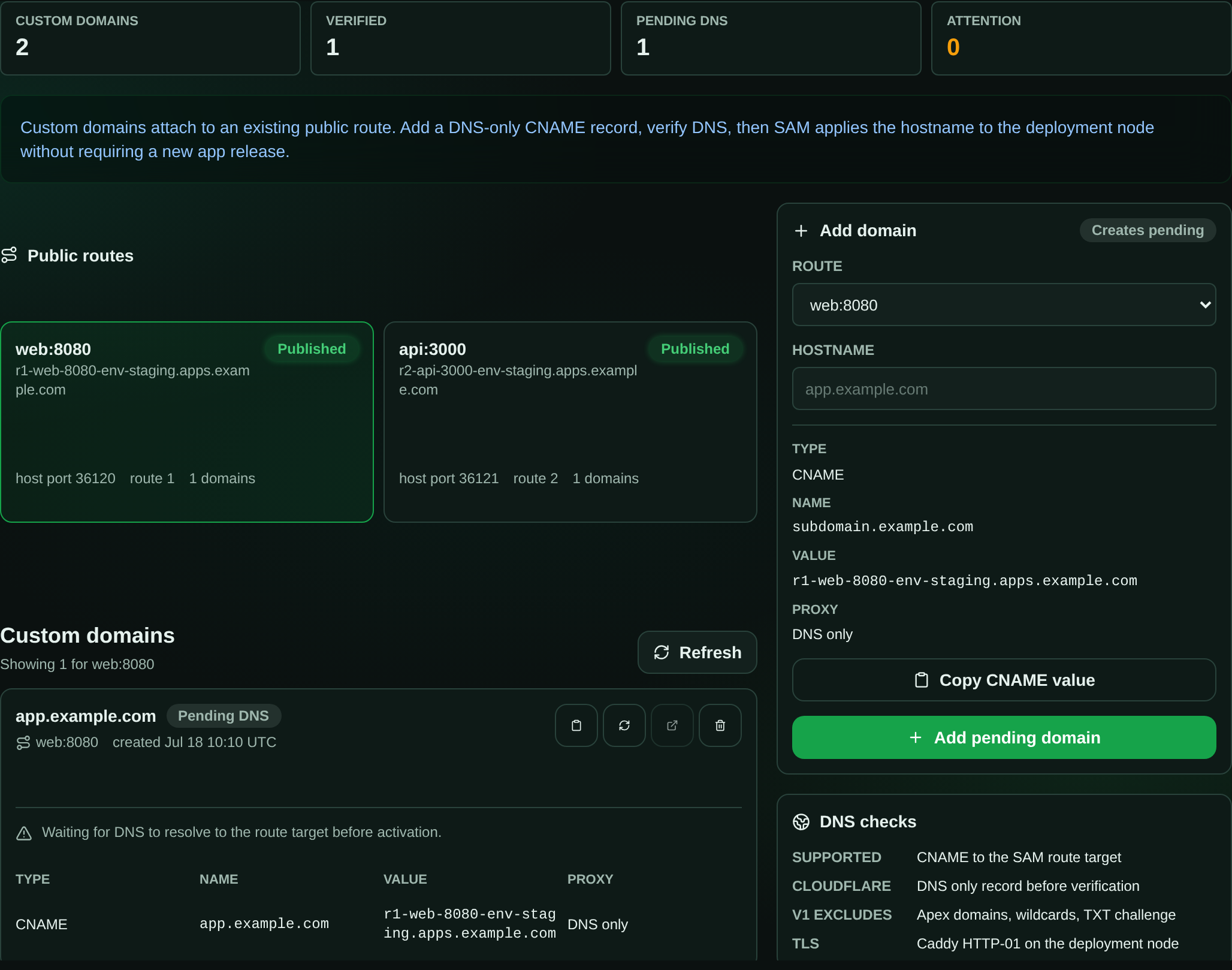
Section titled “Custom domains”Each public route gets a SAM-owned hostname such as
r1-web-3000-env.apps.example.com. You can attach your own subdomain to that
route from the deployment environment’s Domains tab. SAM shows the exact
CNAME target to create, verifies the hostname through DNS-over-HTTPS, and — once
verified — activates the custom hostname on the running app without a full
redeploy.
Custom domains attach to an already-published public route, so publish a release with at least one public route first. Then:
- Open the deployment environment and go to the Domains tab.
- Pick the public route you want to expose and add a concrete subdomain such as
app.example.com(apex/root domains are not supported in this version). - Create a CNAME record from your subdomain to the SAM route hostname shown in the panel. If your DNS provider puts a proxy or CDN in front of records (for example Cloudflare’s orange-cloud toggle), turn it off for this record so verification can see the real target.
- Click Verify after the DNS record propagates. Verification succeeds when the custom hostname resolves to the SAM route hostname, or to the deployment node IP for DNS providers that flatten CNAMEs to A records.
That’s it — you do not need to republish the release. A successful verification queues a route-only activation to the deployment node, which reloads its router and provisions TLS for the new hostname automatically.
Domain states
Section titled “Domain states”The Domains tab shows a live status badge for each domain so you can tell where it is in the lifecycle:
| State | Meaning |
|---|---|
| Pending DNS | Waiting for DNS to resolve to the route target before activation. |
| Activating | DNS is verified and route activation is queued to the node. |
| Active | The node is serving the hostname with TLS. |
| DNS recheck required | The underlying route target changed; re-verify the record. |
| Route missing | The route this domain was attached to no longer exists in the release. |
| DNS mismatch | The record does not point at the expected route target. |
| Inactive | The environment is stopped; the saved domain is preserved. |
| Deactivating | The domain is being removed and the node is dropping the route. |
Saved domains stay visible even when the environment is stopped or in an error state, so a stop/start cycle does not lose your DNS setup. Removing a domain queues a route-only deactivation and finalizes once the node has dropped the route.
SAM does not create or manage your DNS record. Root/apex domains, wildcard domains, TXT-record ownership challenges, and on-demand TLS authorization are out of scope for this version.