
Self-Hosting Guide
This guide walks you through deploying Simple Agent Manager to your own infrastructure. Deployment runs through the Deploy Production GitHub Actions workflow in your own fork, with Pulumi provisioning the Cloudflare resources.
Prerequisites
Section titled “Prerequisites”| Requirement | Purpose | Tier |
|---|---|---|
| Cloudflare account | API hosting, DNS, storage | Workers Paid ($5/mo) |
| GitHub account | Authentication, CI/CD | Free tier |
| Domain on Cloudflare | Workspace URLs | Any registrar |
Workers Paid is required because SAM uses Durable Objects for real-time chat, task execution, and node lifecycle, and Cloudflare Containers for the default instant-session runtime. Go to Workers & Pages in the Cloudflare dashboard to upgrade. You also need R2 enabled for Pulumi state and Analytics Engine enabled (free): Workers & Pages → Analytics Engine → Enable.
You do not need a shared cloud provider account. Users provide their own Hetzner API token, Scaleway API key, Vultr API key, Infomaniak application credential, DigitalOcean token, UpCloud API subaccount, or GCP configuration through the Settings UI. GCP Workload Identity Federation (WIF) uses an optional infrastructure OAuth client; the service-account JSON mode is OAuth-free.
Step 1: Choose Your Domain and Cloudflare Account
Section titled “Step 1: Choose Your Domain and Cloudflare Account”Use a top-level domain as BASE_DOMAIN (e.g., example.com), not a subdomain (sam.example.com). Cloudflare’s free Universal SSL covers *.example.com but not nested wildcards like *.sam.example.com. The root domain is not used by SAM — only api., app., and *. subdomains are created.
SAM derives a resource namespace from this domain for Worker names, storage resources, and generated hostnames. For a single installation, use the generated RESOURCE_PREFIX; do not choose a generic prefix by hand. If you run multiple SAM installations in the same Cloudflare account and DNS zone, give each installation its own validated namespace so app, API, workspace, port, VM, and deployment hostnames do not collide.
Copy your Cloudflare account ID from the dashboard URL. In a URL like https://dash.cloudflare.com/<account-id>/<domain>, the account ID is the 32-character value immediately after dash.cloudflare.com/.
Open your domain overview at https://dash.cloudflare.com/<account-id>/<domain> and copy the Zone ID from the right sidebar.
Step 2: Fork the Repository
Section titled “Step 2: Fork the Repository”Fork simple-agent-manager on GitHub.
Step 3: Create Cloudflare API Token
Section titled “Step 3: Create Cloudflare API Token”In the Cloudflare account from Step 1, enable R2 first if it is not already active. Then open https://dash.cloudflare.com/<account-id>/api-tokens → Create Custom Token:
| Permission Type | Resource | Access |
|---|---|---|
| Account | Cloudflare Workers: D1 | Edit |
| Account | Workers KV Storage | Edit |
| Account | Workers R2 Storage | Edit |
| Account | Workers Scripts | Edit |
| Account | Workers Observability | Read |
| Account | Cloudflare Pages | Edit |
| Account | AI Gateway | Edit |
| Account | Containers | Edit |
| Account | SSL and Certificates | Edit |
| Zone | DNS | Edit |
| Zone | Workers Routes | Edit |
| Zone | SSL and Certificates | Edit |
| Zone | Zone | Read |
Set Zone Resources to your specific domain and Account Resources to your account.
The default deploy configures AI Gateway and writes Analytics Engine data, so keep the AI Gateway permission and enable Analytics Engine even if every user brings their own model keys. SAM also enables the Cloudflare Container instant-session runtime by default, so Containers: Edit is required for the default Worker deploy. The same deploy automatically builds and versions the container vm-agent; no prebuilt image, registry credential, or manual vm-agent version is required. The Account → SSL and Certificates → Edit permission is required for issuing per-node Origin CA certificates used for VM-agent TLS — without it, new nodes cannot obtain a TLS certificate and will fail to boot.
Optional — SAM-hosted repositories (experimental): SAM can create and host Git repositories for projects directly on Cloudflare Artifacts (currently in beta), letting users start a project without connecting GitHub. If your Cloudflare account has Artifacts access, add an Account → Artifacts → Edit permission to the token. The deploy auto-detects whether the token can reach the Artifacts REST API and enables the SAM-hosted project option only when it can — so it is safe to add the permission if it is available, or omit it entirely with no effect. To force the behavior regardless of detection, set the ARTIFACTS_BINDING_ENABLED GitHub Actions variable to true or false.
Because the token includes Workers R2 Storage access, Cloudflare’s final creation screen shows both the API token and a set of R2 S3 keys (Access Key ID + Secret Access Key) together. You do not need to create a separate R2 API token. Copy all of the values before leaving the page:
CF_API_TOKEN— the API token itselfR2_ACCESS_KEY_ID— the R2 S3 Access Key ID shown alongside the tokenR2_SECRET_ACCESS_KEY— the R2 S3 Secret Access Key shown alongside the token
Pulumi uses the R2 S3 keys for its state backend. The deploy workflow creates the Pulumi state bucket later as ${RESOURCE_PREFIX}-pulumi-state.
Step 4: Create GitHub App
Section titled “Step 4: Create GitHub App”You can deploy SAM before creating a GitHub App. On first deploy, SAM generates a one-time SETUP_TOKEN Worker variable and the workflow prints a Cloudflare dashboard link where you can read it. Open https://app.yourdomain.com/setup, paste that token, and configure GitHub App, GitHub OAuth, and Google login OAuth credentials in the setup wizard. The Google login client must have https://api.yourdomain.com/api/auth/callback/google registered as an authorized redirect URI, and is a separate OAuth client from any Google/GCP infrastructure credentials (GOOGLE_CLIENT_ID). The values are stored in SAM’s encrypted platform credential store and can be rotated later by a superadmin.
If you prefer to create the GitHub App first, use the wizard below to create it with all settings pre-filled. Enter your domain, click through to GitHub, and paste the generated values into /setup or set the optional GH_* GitHub Environment secrets before deploy.
Your Domain
Enter the domain you'll use for SAM (the same BASE_DOMAIN you'll set in Step 6).
The GitHub App needs Pull requests: Read-only for pull request and review webhooks, Issues: Read-only for issues/issue_comment, Checks: Read-only for check_run/check_suite, and Actions: Read-only for workflow_run. Subscribe it to push, pull_request, issues, issue_comment, repository, check_run, check_suite, workflow_run, pull_request_review, and pull_request_review_comment. Enable Redirect on update under the Setup URL settings so repository access changes return users to SAM.
Platform integrations after deploy
Section titled “Platform integrations after deploy”Fresh deployments can keep most platform integration credentials out of GitHub Actions secrets. After the first deploy, open /setup with the one-time setup token and configure the integrations users need:
- GitHub App and GitHub OAuth for GitHub-backed projects, pull requests, and repository access.
- Google login OAuth for Sign in with Google. This is separate from Google/GCP infrastructure OAuth.
- GitLab OAuth when users need to create GitLab-backed projects and workspaces.
A superadmin can separately configure Google infrastructure OAuth at /admin/integrations for keyless GCP/WIF setup. It is intentionally absent from /setup so installations do not confuse it with Google login. Runtime integration values are stored encrypted and override environment fallbacks without a redeploy.
Let users report problems
Section titled “Let users report problems”SAM’s in-app Report an Issue flow is off until you nominate a project to receive reports. Create a project for feedback, then open Admin → Integrations (/admin/integrations) and select it under Private feedback project. PLATFORM_FEEDBACK_PROJECT_ID is still supported as a bootstrap/environment fallback, but the in-app runtime setting is preferred and overrides it. Until an effective project exists, the Report button and the crash-screen report link are hidden from every user — so if people tell you there’s no Report button, this is why. The same setting enables hourly automated triage of platform errors into that project. See Reporting Issues.
Let agents ask in chat
Section titled “Let agents ask in chat”Agents can stop and ask the person running a chat for permission, ask them a question, or send a
sign-in link to open — see When the Agent Needs You.
This is off unless you turn it on, on new and updated installations alike. Until then, SAM refuses
every such request the moment an agent makes it, and no card appears. Claude Code and Codex in the
default Bypass Permissions mode rarely ask, so most users won’t notice, but an agent in
Manual, Accept Edits, or Plan Mode — or Amp or Gemini CLI, which ask on their own, or
Claude Code in a devcontainer that
runs as root — is told no
every time it asks to make a change. Release-specific steps are in the self-hoster notes of
Recent Product Changes.
We recommend turning it on; the hosted service has it on. Agents set to ask then wait for an
answer — a permission request for up to 30 minutes in a task and 2 hours in a chat — and only the
person who started the chat can answer, with no notification sent. To turn it on, add these GitHub
Environment variables (not secrets) to your production environment, each set to true:
| Variable | What it turns on |
|---|---|
ACP_INTERACTIONS_ENABLED | Permission requests. The other two need it as well. |
ACP_INTERACTION_FORMS_ENABLED | Questions, in conversation-mode chats |
ACP_INTERACTION_URLS_ENABLED | Links to open (external service requests), in conversation-mode chats |
They take effect at the next deploy: run Deploy Production, or set them before you update so the update’s deploy picks them up. Turning a switch on applies to chats started after that deploy; a chat that sleeps and wakes usually can’t ask yet. To check that it works, start a new chat with a Claude Code profile set to Manual and ask the agent to create a file: a card with a Permission needed badge should appear. Turning a switch off refuses new requests straight away, even in running chats; any already waiting can still be answered until they expire. Deadlines and size limits are in the configuration reference.
Codex needs SAM’s own build of its runtime to ask questions and send links. Every deploy publishes that build to your R2 bucket, and new sessions use it when these variables are on, so there is nothing else to set up.
If you leave requests off, this query finds the saved Claude Code modes whose requests will be
refused, in user settings, profiles, skills, and projects’ Agent Overrides. Run it in the
console of your SAM D1 database (the one bound as DATABASE; its name is in the deploy workflow’s
Pulumi stack output) in the Cloudflare dashboard:
SELECT 'user setting' AS place, NULL AS project_id, u.email AS owner, s.permission_mode AS mode FROM agent_settings s LEFT JOIN users u ON u.id = s.user_id WHERE s.agent_type = 'claude-code' AND s.permission_mode NOT IN ('bypassPermissions', 'dontAsk')UNION ALLSELECT 'profile: ' || p.name, p.project_id, u.email, p.permission_mode FROM agent_profiles p LEFT JOIN users u ON u.id = p.user_id WHERE p.agent_type = 'claude-code' AND p.permission_mode NOT IN ('bypassPermissions', 'dontAsk')UNION ALLSELECT 'skill: ' || k.name, k.project_id, u.email, k.permission_mode FROM skills k LEFT JOIN users u ON u.id = k.user_id WHERE k.agent_type = 'claude-code' AND k.permission_mode NOT IN ('bypassPermissions', 'dontAsk')UNION ALLSELECT 'project: ' || pr.name, pr.id, u.email, pr.agent_defaults FROM projects pr LEFT JOIN users u ON u.id = pr.user_id WHERE pr.agent_defaults LIKE '%"permissionMode":"%';owner is whose Settings → Agents it is, who created the profile or skill, or who owns the
project. A project row lists every agent the project sets a mode for; read its JSON to see which.
Set those modes to Bypass Permissions, or clear them: a user changes their own Settings →
Agents, and any admin of a project can change its profiles and Agent Overrides. A skill’s mode
has no field in the app; change it with SAM’s update_skill tool (ask an agent in the project) or
the API.
GCP provisioning credentials
Section titled “GCP provisioning credentials”Each user connects Google Cloud from Settings → Cloud Provider → Google Cloud. SAM supports two mutually exclusive authentication modes.
Workload Identity Federation (recommended)
Section titled “Workload Identity Federation (recommended)”WIF avoids user-managed private keys and uses short-lived credentials. Before users start the WIF wizard, a superadmin must configure the independent Google infrastructure OAuth client at /admin/integrations, or provide the environment fallback pair GOOGLE_CLIENT_ID and GOOGLE_CLIENT_SECRET.
Register both static redirect URIs on that infrastructure client:
https://api.yourdomain.com/auth/google/callbackhttps://api.yourdomain.com/api/deployment/gcp/callback
The flow requests the Google cloud-platform scope. Runtime values saved by a superadmin are encrypted in D1 and take precedence over the environment pair; removing the runtime pair reveals the environment fallback, if present. This client is never used for user login. Google sign-in uses a different client, different variable names (GOOGLE_LOGIN_*), and only https://api.yourdomain.com/api/auth/callback/google.
Service account JSON (OAuth-free alternative)
Section titled “Service account JSON (OAuth-free alternative)”If the installation has no infrastructure OAuth client, a user can paste or choose a dedicated Google service-account JSON key. SAM ignores endpoint fields from the upload, signs RS256 assertions, exchanges them only at Google’s fixed token endpoint, and verifies access to the selected Compute zone before replacing a working credential.
Create a dedicated least-privilege identity rather than granting Project Owner:
PROJECT_ID="your-gcp-project-id"SERVICE_ACCOUNT="sam-vm-manager@${PROJECT_ID}.iam.gserviceaccount.com"
gcloud services enable compute.googleapis.com --project="${PROJECT_ID}"gcloud iam service-accounts create sam-vm-manager \  --project="${PROJECT_ID}" \  --display-name="SAM VM manager"gcloud projects add-iam-policy-binding "${PROJECT_ID}" \  --member="serviceAccount:${SERVICE_ACCOUNT}" \  --role="roles/compute.instanceAdmin.v1"gcloud projects add-iam-policy-binding "${PROJECT_ID}" \  --member="serviceAccount:${SERVICE_ACCOUNT}" \  --role="roles/compute.securityAdmin"gcloud iam service-accounts keys create sam-service-account.json \  --iam-account="${SERVICE_ACCOUNT}" \  --project="${PROJECT_ID}"
Vertex AI access is optional and is not required for VM provisioning. If your organization policy disables service-account key creation, use WIF or ask a Google Cloud administrator to approve an appropriate key-management policy; do not weaken the policy just for SAM.
SAM encrypts the complete JSON in both credential stores with the configured credential-encryption key. Only safe metadata is returned to the browser. Derived Google access tokens are short-lived and cached only up to their returned expiry. Rotation verifies the new key before atomically replacing all SAM copies. Disconnect removes SAM’s encrypted copies and cached tokens, but it cannot revoke the key in Google Cloud—disable or delete the old key there after a successful rotation or disconnect.
Step 5: Generate Pulumi Passphrase
Section titled “Step 5: Generate Pulumi Passphrase”openssl rand -base64 32Add this passphrase to the GitHub Actions environment in the next step and keep a copy in your password manager for future deployments or teardown.
Step 6: Configure GitHub Environment
Section titled “Step 6: Configure GitHub Environment”In your fork: Settings → Environments → New environment → name it production.
Before adding secrets, open the environment’s Deployment branches and tags setting, choose
Selected branches and tags, and add only the main branch. This external GitHub Environment
policy is required: it prevents a workflow dispatched from another branch or tag from reaching
production secrets, even if that branch changes the workflow’s in-repository checks. Existing
installations must add this policy before their next production deployment.
Environment variables:
| Variable | Description | Example |
|---|---|---|
BASE_DOMAIN | Your domain | example.com |
PREVIEW_BASE_DOMAIN | Optional full preview hostname override; defaults to preview.BASE_DOMAIN. Currently ignored: the deploy doesn’t pass it to the Worker | usercontent.example.com |
PREVIEW_URL_TTL_SECONDS | Optional lifetime for signed interactive-preview URLs. Currently ignored: the deploy doesn’t pass it to the Worker | 300 |
RESOURCE_PREFIX | Domain-derived Cloudflare resource prefix | sa379a6 |
CF_CONTAINER_ENABLED | Optional instant-session runtime toggle. Generated deploys set true; set false to force VM runtime. | false |
D1_READ_REPLICATION_MODE | Optional D1 read-replication mode applied on every deploy. Defaults to auto; set disabled to remove replicas. | disabled |
D1_SESSION_MODE | Optional Worker D1 Sessions anchor. Defaults to first-primary; set disabled to send every query to the primary. | disabled |
D1_RESTORE_RECOVERY_WINDOW_DAYS | Optional D1 restore window for accounts with narrower retention. Defaults to 30; range 1–30. | 7 |
D1_MIGRATION_CHURNING_TABLES | Optional comma-separated <binding>.<table> subset of the reviewed retention/expiry table list. May narrow the built-in list but cannot expand it. | OBSERVABILITY_DATABASE.platform_errors |
D1_MIGRATION_CHURNING_TABLE_MAX_DECREASE_PERCENT | Maximum allowed decrease for reviewed churning tables. Defaults to 50; range 0–100. A decrease exactly at the limit is accepted. | 25 |
ACP_INTERACTIONS_ENABLED | Optional. true lets agents ask users for permission in chat; off unless set. See Let agents ask in chat for it and the two related switches. | true |
By default, each deploy enables D1 read replication (read_replication.mode = "auto") on the
main and observability databases, and the API Worker runs each request against a single D1 session so its
queries after the first can be served by a nearby replica instead of crossing to the primary
region. This is safe by construction: the session is anchored first-primary, so a request never
sees data older than its own start and cannot miss a write that completed before it began, and
queries that do not open a session always go to the primary. (It does not promise that a write
landing during a request is visible to that request’s later queries — that is the ordinary
two-non-atomic-reads race, unchanged by replication and now with a shorter window.) Scheduled sweeps and Durable Objects keep the unsessioned binding. Set
D1_READ_REPLICATION_MODE=disabled to remove the replicas (Cloudflare takes up to 24 hours to
stop routing to them) or D1_SESSION_MODE=disabled to keep the replicas but route every Worker
query at the primary. Replication needs no extra API-token permission beyond the
Account → Cloudflare Workers: D1 → Edit grant the deploy token already requires.
The reviewed default churning selectors are DATABASE.deployment_releases, DATABASE.github_webhook_deliveries, DATABASE.project_files, DATABASE.registry_credential_rate_limits, DATABASE.session_snapshots, DATABASE.sessions, DATABASE.trial_waitlist, DATABASE.trigger_executions, DATABASE.verifications, DATABASE.webhook_deliveries, and OBSERVABILITY_DATABASE.platform_errors. All other application tables retain zero row-decrease tolerance. Leave D1_MIGRATION_CHURNING_TABLES unset to use the complete reviewed default list.
The guided setup generates RESOURCE_PREFIX from BASE_DOMAIN as s plus the
first six hex characters of the domain’s SHA-256 hash. Use that generated value
Deploys automatically create preview.BASE_DOMAIN, its Worker route, and a persistent Pulumi-managed signing key. No manual GitHub secret is required. Keep the default hostname single-level so Cloudflare Universal SSL covers it. An override is for operators who have separately arranged DNS/TLS for that full hostname.
instead of choosing a generic prefix.
Leaving CF_CONTAINER_ENABLED at the true the deploy workflow injects lets users start work
without their own cloud credential, on Instant sessions.
Setting it to false means every session provisions a cloud VM. SAM chooses a
project-scoped compute credential first when one is attached to the project, then
falls back to the user’s personal compute credential, then to an enabled platform
compute credential configured by an administrator.
GitHub Environment secrets:
| Secret | Description |
|---|---|
CF_API_TOKEN | Cloudflare API token |
CF_ACCOUNT_ID | Cloudflare account ID (32-char hex) |
CF_ZONE_ID | Domain zone ID (32-char hex) |
R2_ACCESS_KEY_ID | R2 API token access key |
R2_SECRET_ACCESS_KEY | R2 API token secret key |
PULUMI_CONFIG_PASSPHRASE | Generated passphrase |
GH_CLIENT_ID | Optional GitHub App client ID; can be configured in /setup instead |
GH_CLIENT_SECRET | Optional GitHub App client secret; can be configured in /setup instead |
GH_APP_ID | Optional GitHub App ID; can be configured in /setup instead |
GH_APP_PRIVATE_KEY | Optional GitHub App private key (PEM or base64); can be configured in /setup |
GH_APP_SLUG | Optional GitHub App URL slug; can be configured in /setup instead |
GH_WEBHOOK_SECRET | Optional GitHub App webhook secret; can be configured in /setup instead |
GOOGLE_LOGIN_CLIENT_ID | Optional Google login OAuth client ID (Sign in with Google); can be configured in /setup instead. Register redirect URI https://api.yourdomain.com/api/auth/callback/google |
GOOGLE_LOGIN_CLIENT_SECRET | Optional Google login OAuth client secret; can be configured in /setup instead |
GITLAB_HOST | Optional GitLab OAuth host, such as https://gitlab.com; can be configured in /setup instead. Register redirect URI https://api.yourdomain.com/api/auth/callback/gitlab and grant the read_user and api scopes (api is required for repository clone/push and merge-request creation in GitLab-backed workspaces) |
GITLAB_CLIENT_ID | Optional GitLab OAuth application ID; can be configured in /setup instead |
GITLAB_CLIENT_SECRET | Optional GitLab OAuth secret; can be configured in /setup instead |
GOOGLE_CLIENT_ID | Optional environment fallback for the Google infra/GCP OAuth client ID. A superadmin can configure the independent runtime pair at /admin/integrations; not used for login. |
GOOGLE_CLIENT_SECRET | Optional environment fallback for the Google infra/GCP OAuth client secret. Runtime admin configuration takes precedence; not used for login. |
CF_AIG_TOKEN | Optional narrower Cloudflare AI Gateway Unified Billing token |
DEVCONTAINER_CACHE_CLOUDFLARE_API_TOKEN | Optional narrower Cloudflare token for managed devcontainer registry credentials |
DEVCONTAINER_CACHE_CLOUDFLARE_ACCOUNT_ID | Optional Cloudflare account override for managed devcontainer registry credentials |
Step 7: Deploy
Section titled “Step 7: Deploy”Go to Actions → Deploy Production → Run workflow. Choose the main branch. You may leave target_commit_sha empty to deploy the current main tip, or paste the current main tip’s exact 40-character commit SHA. Historical commits and non-main commits are rejected. No additional commit is needed after the environment is configured.
The workflow:
- Validates configuration
- Provisions infrastructure via Pulumi (D1, KV, R2, DNS), including private VM diagnostic evidence, ProjectData archived tool payloads, one-day temporary uploads, and thirty-day TTS cache objects (
infra/resources/storage.ts:r2BucketLifecycle) - Runs database migrations
- Builds the VM Agent reproducibly and publishes both architectures under immutable keys containing the deployment commit SHA
- On a fresh installation only, bootstraps the API Worker and its Tail Worker binding
- Deploys the Web UI, applies API Worker secrets in one bulk revision, and publishes the final API Worker code
- Runs health checks
On an established installation, the workflow skips the bootstrap Worker revisions. It publishes the immutable VM Agent artifacts before the API Worker can require them, applies secrets in one bulk revision, and then publishes code once. Re-running the same commit reuses an existing artifact only when its digest matches and fails before Worker publication if the bytes differ.
The artifact publisher also initializes missing legacy binaries for unversioned downloads, including later skip_agent deployments on a fresh installation. Existing legacy binaries are preserved unchanged so a partial deployment cannot replace bytes still needed by the live Worker.
Before publishing final API Worker code, the workflow reads its applied Durable Object migration tag. A fresh installation creates every namespace with SQLite storage; an existing installation retains its already-applied namespace history and storage backends. This is automatic—do not edit historical migration entries or create namespaces manually.
Pulumi also creates or updates the assets bucket lifecycle resource on every deploy.
The defaults are sessionSnapshotTtlDays=7, diagnosticIncidentTtlDays=7,
tempUploadTtlDays=1, and ttsTtlDays=30; each accepts a positive-integer Pulumi
config override. The scheduled Worker owns session expiry at seven days of actual sleep,
including chat terminalization and R2 deletion. Session objects deliberately have no
age-only R2 lifecycle because their object age begins before sleep and must never shorten
the restore window. There is likewise no age-only rule for ProjectData archived tool
payloads, durable library/ data, or release-referenced compose-image-artifacts/.
If migration state cannot be read or does not match the checked-in history, deployment stops before Wrangler runs rather than risking migration replay or namespace replacement.
The workflow also records D1 row counts before migrations. It compares a database only when that database’s D1 migration ledger advances, so ordinary traffic cannot fail a deploy when no migration ran. Business tables have zero decrease tolerance. Code-reviewed tables with automatic retention or expiry use a 50% default limit so small routine churn is accepted while a destructive wipe still blocks deployment. Self-hosters can narrow (but not expand) that reviewed table list with the D1_MIGRATION_CHURNING_TABLES repository variable and tune the limit with D1_MIGRATION_CHURNING_TABLE_MAX_DECREASE_PERCENT (0–100).
If deployment stops with POST-MIGRATION DATA INTEGRITY CHECK FAILED, it has blocked Worker deployment before serving against the suspect database state. The failed step prints the pre-migration RFC3339 recovery timestamp and an exact wrangler d1 time-travel restore command for each database. Preserve that output and inspect the reported table decreases before restoring.
For guided recovery, run the D1 Time Travel Restore workflow (d1-restore.yml). The workflow keeps the existing timestamp input name for compatibility, but the value may be any Cloudflare D1 restore point:
- Unix seconds, such as
1786083379 - An RFC3339/JavaScript date-time with an explicit timezone, such as
2026-08-07T06:16:19Zor2026-08-07T08:46:19.123+02:30 - A lowercase D1 bookmark in the
8-8-8-32hexadecimal form printed by Wrangler, such as00000085-0000024c-00004c6d-8e61117bf38d7adb71b934ebbf891683
The validator rejects malformed values, shell metacharacters, missing timezones, future timestamps, and timestamps outside the configured recovery window before the workflow exposes Pulumi or Cloudflare credentials. The default window is 30 days. If the account has a narrower retention policy, set the repository variable D1_RESTORE_RECOVERY_WINDOW_DAYS to a whole number from 1 through 30.
Always preview first with dry_run=true; select main, observability, or both, then repeat the same command with dry_run=false only after confirming the target. The preview runs non-mutating Time Travel lookups for every selected Pulumi-resolved database and never calls the restore operation. For a bookmark, those lookups verify that it sorts between the target database’s currently retrievable recovery-window minute and current bookmark. The boundary lookup stays one D1 minute inside the moving retention cutoff so process and service clock advancement cannot invalidate the lookup itself; consequently, the earliest boundary minute is intentionally excluded. Cloudflare remains authoritative about whether a bookmark belongs to that database. For example:
gh workflow run d1-restore.yml --ref main \ -f environment=production \ -f timestamp=2026-08-07T06:16:19Z \ -f database=both \ -f dry_run=trueThe GitHub Environment named by environment still controls the required approval and secrets. The main selection uses only the Pulumi d1DatabaseName output, observability uses only observabilityD1DatabaseName, and both preflights both before either restore step can run.
After reviewing the preview, repeat the command with -f dry_run=false. Each successful restore prints JSON containing bookmark and previousBookmark. Preserve that output: previousBookmark is the undo point. To undo, run the workflow twice with that bookmark in the timestamp field—first with dry_run=true, then with dry_run=false after confirming the exact environment and database target. Do not copy the raw bookmark into an ad hoc shell command.
If deployment stops with a Durable Object migration-state error:
- Errors mentioning listing lag or a Worker “created moments ago” are transient. The workflow already retries the state probe a few times (tune with the
DO_MIGRATION_STATE_PROBE_ATTEMPTSandDO_MIGRATION_STATE_PROBE_RETRY_DELAY_MSGitHub repository variables); re-running the deployment is safe and resumes cleanly. - “tag is not present in the checked-in history” means
apps/api/wrangler.tomllost migration entries that were already applied to your Worker — usually an upgrade merge that dropped fork-local[[migrations]]entries. Restore the missing entries so the deployed tag appears in the history, then redeploy. - Never delete the API Worker to recover. Deleting a Worker destroys every Durable Object namespace behind it — all chat sessions, messages, and task state. There is no undo.
VM diagnostic evidence, ProjectData archived tool payloads, and terminal-session archive chunks/manifests use the existing application R2 bucket; there is no separate bucket or manually generated secret to configure. Pulumi creates an independent lifecycle rule for the private diagnostic prefix and the deployment sync binds the same bucket as PROJECT_DATA_ARCHIVE_R2 for ProjectData archival. Optional stack settings are diagnosticIncidentPrefix (default diagnostic-incidents) and diagnosticIncidentTtlDays (default 7, any positive integer). Keep the diagnostic prefix private and distinct from the reserved application namespaces agents, cli, compose-image-artifacts, library, project-data, resource-history, session-snapshots, temp-uploads, and tts; Pulumi rejects overrides whose top-level segment would expire objects owned by one of those features.
Verification
Section titled “Verification”After deployment completes:
# API health checkcurl https://api.yourdomain.com/health# Should return: {"status":"healthy","timestamp":"..."}Open the Cloudflare dashboard link printed by the workflow, copy the plaintext SETUP_TOKEN Worker variable, then open https://app.yourdomain.com/setup. The setup page accepts the token only while first-run setup is incomplete. After you save a valid login provider and complete setup, /setup returns Gone and future changes move to the superadmin platform config UI.
Open https://app.yourdomain.com — you should see the login page with whichever providers you configured.
If you enabled GitLab in platform configuration, create a test project from a GitLab repository and start a lightweight chat before inviting users. That validates the OAuth app, repository metadata propagation, and workspace credential helper path together.
Updating an Existing Self-Hosted Instance
Section titled “Updating an Existing Self-Hosted Instance”Pushing upstream changes to your fork’s main branch does not update the running instance by itself. Self-host forks skip the canonical repository’s full main-push CI path, so the automatic workflow_run production deploy is not the update mechanism for forks.
Before you update, read the For self-hosters & admins notes in Recent Product Changes for every cycle since your last update. They list new and changed settings, and from the 23–29 September 2026 cycle on, they also say whether updating needs any action from you.
Option A: Update Self-Hosted Instance workflow (recommended)
Section titled “Option A: Update Self-Hosted Instance workflow (recommended)”The Update Self-Hosted Instance workflow (update-self-hosted.yml) automates the entire update process. It fetches the upstream release, fast-forwards your fork’s main branch, and triggers a production deploy automatically.
- Open Actions → Update Self-Hosted Instance → Run workflow in your fork.
- Leave
releaseaslatestto use the most recent upstream release, or enter a specific CalVer tag (e.g.v2026.09.20). - The workflow fast-forwards
mainto the release commit and triggers Deploy Production. - Wait for the Deploy Production workflow to finish, then re-run the health check above.
If your fork has local commits that are not in the upstream release, the workflow will fail with a fast-forward error. In that case, merge manually and use Option B.
Option B: Manual deploy
Section titled “Option B: Manual deploy”- Sync your fork’s
mainbranch with upstream (e.g. via GitHub’s “Sync fork” button orgit fetch upstream && git merge upstream/main). - Open Actions → Deploy Production → Run workflow in your fork.
- Choose the
mainbranch and leavetarget_commit_shaempty (it defaults to the currentmaintip). Optionally paste the currentmaintip’s exact 40-character SHA. Historical commits are rejected. Leavedry_rundisabled. - Wait for the workflow to finish, then re-run the health check above.
Use the manual workflow when you rotate deployment secrets, change GitHub Environment variables, or want to re-apply Pulumi-managed infrastructure.
First Login & Admin Access
Section titled “First Login & Admin Access”The first genuine human to sign in to a fresh deployment becomes the superadmin — the account that can approve other users, manage platform credentials, and reach the admin dashboard.
Fresh deployments are seeded with an internal sentinel user (system_anonymous_trials, status='system', created by a database migration) used for anonymous trials. This sentinel is not a real user and never counts toward “is this the first human” checks. Two mechanisms guarantee the first real human is promoted regardless of the sentinel:
- Deploy-time backfill (migration): when a deployment has exactly one non-system human and no superadmin yet, that human is promoted to
superadmin/activewhen migrations run. This also covers accounts created via token-login or device-flow. - Login-time self-heal (all sign-in paths): on every session creation — GitHub OAuth, token-login, and device-flow — if the signing-in user is the only non-system human and no superadmin exists, they are promoted in a single atomic, idempotent write. A failure here never blocks login.
Both mechanisms apply the same promotion conditions and are strictly no-ops in any other state — they never promote a second user, never touch an existing superadmin, and never auto-promote a suspended or system account. They differ only in how they exclude the sentinel: the login-time hook excludes it by both status='system' and id, while the deploy-time migration excludes it by status='system' alone. On managed/multi-user deployments nothing changes.
Notes:
- Promotion happens regardless of
REQUIRE_APPROVAL. Even with open registration, the first human owns the deployment. - First-login race: if two brand-new users sign in at the exact same moment, the atomic guard ensures at most one becomes superadmin; the other remains a normal user.
- Cookie-cache staleness: the session role is cached for up to 5 minutes. If you were promoted while already holding a session (e.g. the deploy-time backfill ran during a deploy while you were logged in), the cached session still shows your old
userrole. Log out and log back in to pick up superadmin access immediately; otherwise you must wait for the cache to expire (up to 5 minutes). If the admin dashboard is still not visible after re-logging in, the promotion did not occur — recheck the guard conditions above.
Overriding the sentinel id (optional)
Section titled “Overriding the sentinel id (optional)”The sentinel user id defaults to system_anonymous_trials. If your deployment uses a different sentinel id, set TRIAL_ANONYMOUS_USER_ID to that value so the first-user checks exclude it correctly. This variable scopes the login-time self-heal hook and the first-user creation check; the deploy-time migration excludes the sentinel by its status='system' flag (not by id), so it stays correct regardless of this setting because the sentinel is always seeded with status='system'. Most deployments never need to set this.
Storage and archive circuit breakers
Section titled “Storage and archive circuit breakers”Admin → Storage (/admin/storage) shows per-project ProjectData storage telemetry and the archive-sharding circuit breakers. When a project’s archive drain fails repeatedly, its breaker opens and the scheduled sweep stops archiving that project until a superadmin closes the breaker. Each opening sends every active superadmin one high-urgency Operational Failure notification that links to this page, and records one entry in Admin → Errors. Use the Close breaker button on that page (it works from a phone) once the underlying failure is fixed; it calls POST /api/admin/project-data/storage/:projectId/archive-sharding/circuit-breaker with state: "closed" and the reason you enter. Closing a breaker does not thaw migrations that were already frozen.
Below the breakers, Problem migrations lists the individual session migrations that need attention, each with its error code, attempt count, and timestamps:
| Badge | Meaning |
|---|---|
| Failed | An attempt failed. The sweep retries it after PROJECT_DATA_ARCHIVE_FAILED_RETRY_DELAY_MS (an hour by default). |
| Poisoned | It failed PROJECT_DATA_ARCHIVE_POISON_AFTER_ATTEMPTS times (3 by default), which is what opens the project’s breaker. |
| Frozen | The sweep has stopped trying it. The Error code says why, and whether you need to do anything (below). |
What to do, by what the card shows:
- Frozen, error code
precopy_refused: nothing. The session was still in use when the sweep tried to copy it, so nothing was copied and it reads normally; the sweep tries it again afterPROJECT_DATA_ARCHIVE_PRECOPY_REFUSAL_RETRY_MS(a week). The list shows these last. - Frozen, error code
operator_abandoned: nothing. Someone already abandoned it, and the card stays in the list as a record. These records are never removed, and the list puts older entries first, so over time they can push newer problems past its limit (PROJECT_DATA_ARCHIVE_ROLLOUT_LIST_LIMIT_DEFAULT, 25). When the page says more may exist beyond the limit, openhttps://api.yourdomain.com/api/admin/project-data/storage/archive-sharding/problem-migrations?limit=100&projectId=<id>in a browser tab where you’re signed in as a superadmin (100 is the default maximum; leave outprojectIdto list every project). - Failed: nothing yet. If it keeps failing it turns Poisoned.
- Poisoned, or Frozen with any other error code: read the error and fix its cause first. Then clear the migration with Abandon (or a copy-back, if it already deleted its source — see below), and finally Close breaker for the project, because abandoning a migration does not close the breaker.
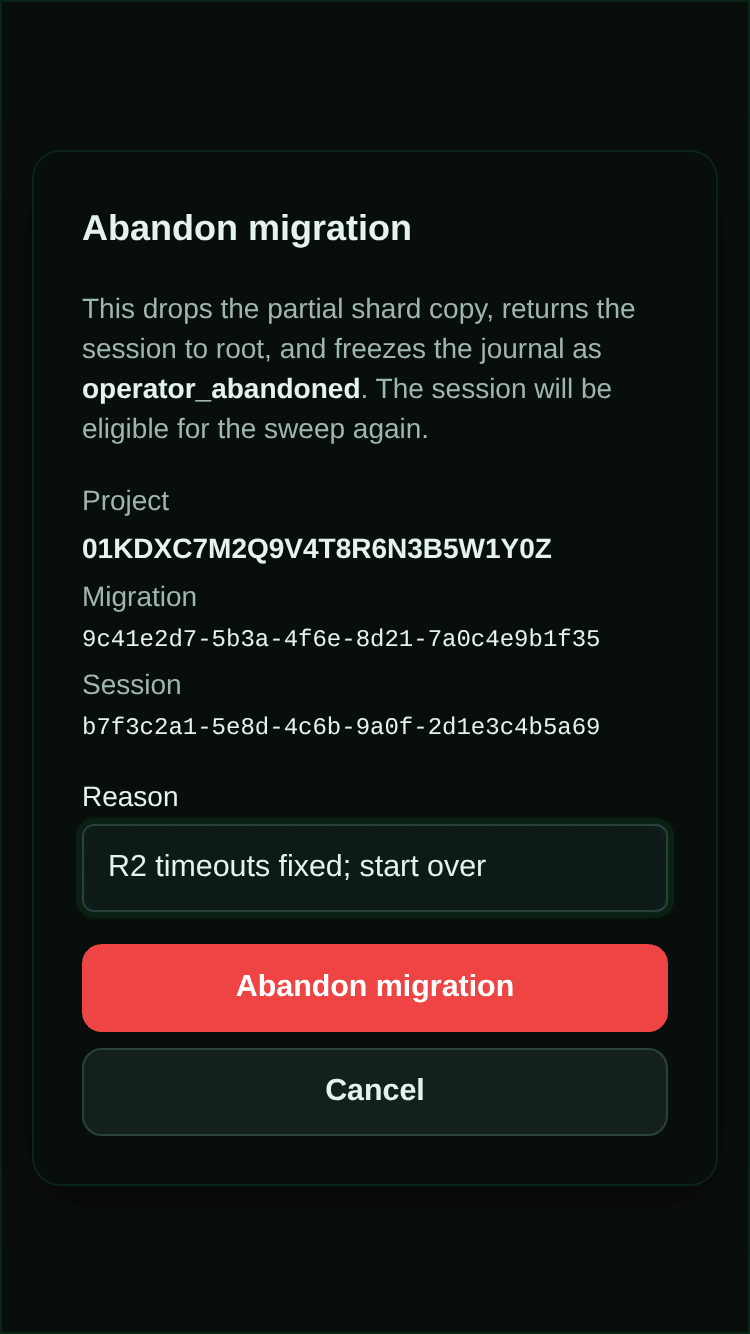
Abandon clears a migration that never got as far as deleting the session from the project’s live storage. It discards the partial archive copy, returns the session to live storage so it reads normally, and makes it eligible for a later sweep; you have to enter a reason. (The dialog calls these the partial shard copy and root, and records the result as operator_abandoned.) SAM refuses, and the page shows its reason verbatim, when the migration is still running (its lease has not expired) or has already deleted its source. That second case needs a copy-back instead, which has no button yet: POST /api/admin/project-data/storage/:projectId/archive-sharding/migrations/:migrationId/copy-back with a reason.
When a project reaches the 10 GB storage cap
Section titled “When a project reaches the 10 GB storage cap”Cloudflare limits each project’s storage object to 10 GB. Admin → Storage shows how close each
project is. At the cap every write to that project fails: new tasks and chat messages get
PROJECT_DATA_STORAGE_FULL (“ProjectData storage is full; storage recovery is required before this
write can complete.”), and putting sessions to sleep fails too. So do the archive drain and
Abandon, because each has to write something before it can free space, and the routine search
cleanup switches itself off just before the cap.
A superadmin recovery endpoint can remove the search index of older finished sessions without removing their messages, but it does not yet have a control in Admin → Storage. There is currently no supported recovery button for a project already at the cap. Monitor storage and resolve stuck archive migrations through Admin → Storage before writes stop working.
Teardown
Section titled “Teardown”To remove all resources: Actions → Teardown → Run workflow → type DELETE to confirm.
Cost Estimation
Section titled “Cost Estimation”Platform Costs
Section titled “Platform Costs”| Component | Free Tier | Paid Overage |
|---|---|---|
| Cloudflare Workers | 100K req/day | $0.15/million |
| Cloudflare D1 | 5M rows read/day | $0.001/million |
| Cloudflare KV | 100K reads/day | $0.50/million |
| Cloudflare R2 | 10GB storage | $0.015/GB/month |
| Cloudflare Pages | Unlimited | Free |
The Workers Paid plan ($5/month) is required for Durable Objects and Cloudflare Containers. Beyond the base plan, usage-based costs stay within free tier allowances for small to medium usage.
User VM Costs
Section titled “User VM Costs”VMs are billed to the cloud provider credential SAM uses for the node. In a typical self-hosted setup, that is each user’s own BYOC credential; admins may also configure a platform credential for shared zero-config provisioning. SAM supports Hetzner, Scaleway, Vultr, Infomaniak, DigitalOcean, UpCloud, and GCP. The example prices below cover the built-in Hetzner, Scaleway, Vultr, DigitalOcean, and UpCloud size mappings; Infomaniak and GCP pricing depend on the selected region and machine configuration.
When Infrastructure Compute Pools are enabled, the editor uses the provider-native catalog for the
project, user, or platform credential in scope. The small/medium/large prices below remain useful as
legacy provider examples, but pool editing is based on concrete provider instance types. Deprecated
legacy size labels are translated into workload slices for compatibility; they do not choose a
provider SKU directly, and changing one does not rewrite the native provider payload. Exact native
offerings carry their own storage/image/architecture request details where the provider API supports
them. After a VM
is created, the provider package returns provider-reported server type and resource fields as
provenance-labeled observed hardware and leaves omitted resource fields unknown
(packages/providers/src/native-vm-config.ts). Persisting those observations into node-pool
admission records is part of the parent section C integration.
Hetzner:
| Size | Specs | Hourly | Monthly |
|---|---|---|---|
| Small (cx23) | 2 vCPU, 4GB RAM | ~$0.007 | ~$4.15 |
| Medium (cx33) | 4 vCPU, 8GB RAM | ~$0.012 | ~$7.50 |
| Large (cx43) | 8 vCPU, 16GB RAM | ~$0.030 | ~$18 |
Scaleway:
| Size | Type | Hourly |
|---|---|---|
| Small (DEV1-M) | 3 vCPU, 4GB RAM | ~€0.024 |
| Medium (DEV1-XL) | 4 vCPU, 12GB RAM | ~€0.048 |
| Large (GP1-S) | 8 vCPU, 32GB RAM | ~€0.084 |
Vultr:
| Size | Specs | Monthly |
|---|---|---|
| Small (vc2-2c-4gb) | 2 vCPU, 4GB RAM, 80GB | ~$20 |
| Medium (vc2-4c-8gb) | 4 vCPU, 8GB RAM, 160GB | ~$40 |
| Large (vc2-6c-16gb) | 6 vCPU, 16GB RAM, 320GB | ~$80 |
Vultr bills hourly and the default region is fra (Frankfurt). When you create the Vultr Personal Access Token, its IP access control allowlist must be set to Allow All IPv4/IPv6 — SAM calls the Vultr API from Cloudflare Workers, which have no static egress IP, so a restricted allowlist will reject provisioning requests.
DigitalOcean:
| Size | Specs | Monthly |
|---|---|---|
| Small (s-2vcpu-4gb) | 2 vCPU, 4GB RAM, 80GB | ~$24 |
| Medium (s-4vcpu-8gb) | 4 vCPU, 8GB RAM, 160GB | ~$48 |
| Large (s-8vcpu-16gb) | 8 vCPU, 16GB RAM, 320GB | ~$96 |
DigitalOcean bills hourly, defaults to fra1 (Frankfurt), and requires a Full Access Personal Access Token (or equivalent custom scopes for droplets, block storage, tags, account, actions, images, regions, and sizes).
UpCloud:
| Size | Specs | Approx. monthly |
|---|---|---|
| Small (2xCPU-4GB) | 2 vCPU, 4GB RAM | ~$12 |
| Medium (4xCPU-8GB) | 4 vCPU, 8GB RAM | ~$24 |
| Large (8xCPU-16GB) | 8 vCPU, 16GB RAM | ~$48 |
UpCloud billing is usage-based. SAM verifies the configured simple plan and zone through the current API before provisioning; the default zone is de-fra1 (Frankfurt). Create a dedicated API subaccount with API access and storage permissions, then enter its username and password in Settings. Prices are indicative; verify current regional pricing in the UpCloud calculator.
Unresponsive machines are released automatically
Section titled “Unresponsive machines are released automatically”A workspace VM that stops sending heartbeats is released rather than left running up a bill and holding provider quota. That covers every cloud VM SAM manages for workspaces — the ones it provisioned automatically and the ones users created from the Nodes page:
- After
NODE_UNHEALTHY_DRAIN_AFTER_MS(10 minutes) of silence, SAM posts a notice in each chat on the VM and asks those sessions to sleep, so idle ones can be woken on another machine later. Once every session on the VM is asleep, or if it had none, SAM deletes the VM right away. - Otherwise, after
NODE_UNHEALTHY_RELEASE_AFTER_MS(30 minutes), SAM deletes the VM through the provider and fails any task still running on it, with a message naming the lost node.
Machines users enrolled themselves (bring-your-own nodes), app-deployment nodes, and Instant containers are left alone. If half or more of the running workspace VMs go silent at once (NODE_UNHEALTHY_FLEET_MAX_FRACTION, applied once there are at least NODE_UNHEALTHY_FLEET_MIN_NODES, default 3), SAM assumes it has stopped receiving heartbeats rather than that every machine died. It then holds everything — no chat notices, no sleep requests, no deletions — and, once the silence outlasts the two windows combined (40 minutes by default), logs node_cleanup.fleet_heartbeat_intake_escalation_required for you to investigate. Each health decision is recorded in the node_health_events table, which keeps its rows after the node itself is deleted. The settings are in Idle & Orphan Node Reaping.
Troubleshooting
Section titled “Troubleshooting”For what SAM does with a workspace VM that stops responding, see Unresponsive machines are released automatically.
Agents stop whenever they need approval
Section titled “Agents stop whenever they need approval”If agents stop each time they need permission and no card appears in the chat, agent requests are
off, so SAM refuses every request. (With requests on, a chat that has slept and woken usually does the
same: it can’t ask yet, so fork it or start a new chat.) Turn them on as described in
Let agents ask in chat, or have users switch those agents to Bypass
Permissions, then start a new chat — running sessions keep the setting they started with. Amp and
Gemini CLI ask on their own even in Bypass Permissions, and so does Claude Code in a devcontainer that
runs as root; for them, turn
requests on or fix the devcontainer user.
”ProjectData storage is full”
Section titled “”ProjectData storage is full””If writes to one project fail with “ProjectData storage is full; storage recovery is required before this write can complete.”, that project has reached Cloudflare’s 10 GB limit. See When a project reaches the 10 GB storage cap.
”error: failed to decrypt state”
Section titled “”error: failed to decrypt state””Your PULUMI_CONFIG_PASSPHRASE doesn’t match the one used when state was created. Use the original passphrase or delete the stack in R2 and start fresh.
”OAuth callback failed” / redirect URI mismatch
Section titled “”OAuth callback failed” / redirect URI mismatch”Check that your GitHub App’s Callback URL matches your BASE_DOMAIN exactly: https://api.yourdomain.com/api/auth/callback/github. If you changed BASE_DOMAIN after initial setup, update the Callback URL, Setup URL, and Webhook URL on the same GitHub App.
Origin CA Certificate Error (1016)
Section titled “Origin CA Certificate Error (1016)”Your API token is missing the Account → SSL and Certificates → Edit permission. New nodes require this permission so the API Worker can sign the node-generated CSR via Cloudflare Origin CA for VM-agent TLS. Edit the token in the Cloudflare dashboard and add it.
Rotating legacy shared Origin CA certificates
Section titled “Rotating legacy shared Origin CA certificates”Older deployments may have existing nodes that were provisioned before per-node CSR signing and therefore received the legacy shared ORIGIN_CA_KEY in cloud-init. To rotate safely:
- Drain or delete existing workspace/deployment nodes so no running VM depends on the old certificate/key pair.
- Re-deploy SAM with this per-node certificate model so new nodes generate their own private key locally and fetch only a signed certificate.
- In Cloudflare SSL/TLS → Origin Server, revoke the old wildcard Origin CA certificate after all old nodes are gone.
- Remove any manually configured
ORIGIN_CA_CERTorORIGIN_CA_KEYWorker secrets. They are legacy rotation inputs and are not required for new node provisioning.
Analytics Engine Not Enabled (10089)
Section titled “Analytics Engine Not Enabled (10089)”Go to Workers & Pages → Analytics Engine → Enable. This is free but must be explicitly activated.
Durable Objects Free Plan Error (10097)
Section titled “Durable Objects Free Plan Error (10097)”Upgrade to the Workers Paid plan ($5/month). Go to Workers & Pages → upgrade plan.
Containers Forbidden
Section titled “Containers Forbidden”Your API token is missing the Account → Containers → Edit permission. SAM enables Cloudflare Container instant sessions by default, so edit the token and add the permission. To deploy without the container runtime, set the GitHub environment variable CF_CONTAINER_ENABLED=false and re-run the workflow.
SSL Handshake Failure
Section titled “SSL Handshake Failure”If using a subdomain as BASE_DOMAIN (e.g., sam.example.com), the free Universal SSL certificate does not cover nested wildcards (*.sam.example.com). Use a top-level domain as BASE_DOMAIN instead.
DNS Record Already Exists
Section titled “DNS Record Already Exists”If you changed BASE_DOMAIN, old DNS records from a previous deployment may conflict. Go to Cloudflare DNS and delete the stale api, app, and * records, then re-run the deploy.
”D1_ERROR: no such table”
Section titled “”D1_ERROR: no such table””Migrations haven’t been applied. The deploy workflow runs them automatically, but you can also run manually:
wrangler d1 migrations apply <deployed-d1-database-name> --remoteUse the D1 database name from the deploy workflow’s Pulumi stack output.
”Workspace stuck in provisioning”
Section titled “”Workspace stuck in provisioning””Check Hetzner console for VM status. If the VM is running, SSH in and check systemctl status vm-agent.
This page is the canonical troubleshooting reference for self-hosted deployments.
Compact conversation archives
Section titled “Compact conversation archives”Compact SQLite/R2 archive writes are opt-in (PROJECT_DATA_ARCHIVE_COMPACT_ENABLED=false). Deployment supplies the existing private archive bucket; no new credentials are required. Before enabling, validate history, search and copy-back on staging and choose a migration allowance with room for normal account usage. Keep archived R2 objects for as long as their conversations exist. See the format, cost controls and recovery limits.
AI app Connector
Section titled “AI app Connector”The user-level SAM Connector is enabled by default. Connect Claude, ChatGPT, or a command-line client from Settings → Access; manage installation policy in Admin → Integrations → Connector. See Use SAM from Claude and ChatGPT.
Each installation has its own OAuth issuer and audience. Pulumi provisions the OAUTH_KV namespace and Worker binding. Vendor servers must reach the API host’s discovery endpoints, /oauth/*, and /connect/mcp; Cloudflare Access login walls or WAF challenges on these paths can block connection and refresh. Keep SAM’s OAuth authentication enforced when adjusting those network policies. Users also need the web host for sign-in and consent.