
Agent Context
Agent Context, in a project’s navigation, shows what the project’s agents know before you say
anything: the facts and preferences they remember (Memory) and the rules they follow
(Policies). Agents read both at the start of every session, through their get_instructions
tool, along with the repository’s own instruction files such as CLAUDE.md and AGENTS.md.
Use it when an agent keeps doing something you corrected before, when you want to know why it behaved a certain way, or to keep the project’s rules short enough that agents read them in full.
The four tabs
Section titled “The four tabs”- Overview: counts of memory entities, active policies and recent agent actions, anything that needs attention, and the Context stack: what agents see for this project, from repository instructions to profiles.
- Memory: what agents have remembered, grouped by subject (an entity such as
User,CodeQualityorArchitecture). Each fact (an observation) shows its confidence. Expand an entity to edit or delete a fact, or delete the whole entity. - Policies: the project’s rules, preferences and constraints. See Policies.
- Agent actions: recent activity events and state changes in the project.
Filter… at the top narrows the open tab by name, text or category.
How things get here
Section titled “How things get here”Agents write memory and policies themselves, with their knowledge_write and policies_write
tools. They are told to save a fact when you correct them, state a preference, or describe how the
project works. There is no form to add one by hand: tell an agent in any chat, for example “remember
that we never use default exports” or “make it a project policy that pull requests need a
changelog entry”, and it records it.
What you can do here is review and correct: edit a fact or policy that is wrong, switch a policy off, or delete what no longer applies.
Policies
Section titled “Policies”A policy is a durable instruction for every agent in the project. Each one has a Title, its Content, a Category and a Confidence:
| Category | Means |
|---|---|
| rule | Something agents must do or must not do |
| constraint | A technical or business limit agents must work within |
| delegation | What agents may decide on their own, and what they must ask you about |
| preference | Softer guidance agents follow unless they have a good reason not to |
Policies are instructions, not enforcement: agents read and follow them, and SAM does not block an action that breaks one. Each card also shows active or inactive, task-scoped for a policy that applies to one task only, and expired for one whose end date has passed. Inactive and expired policies are not sent to agents. To switch one off without deleting it, edit it and clear Active policy. Editing and deleting need permission to change the project’s settings.
Pinned or on demand
Section titled “Pinned or on demand”Every policy has a two-way switch for how agents receive it:
- Pinned (the default): its full text is sent to every agent session in the project.
- On demand: agents get only its title in a list, and its full text only when their work matches
it: the task’s title and description, the chat’s topic, or the idea it is working on. An agent can still read any listed policy in full with
policies_read.
Above the cards, a summary shows what this costs every session, for example “4,210 characters sent to every agent session from 12 pinned policies (all policies, not just filtered ones)” (the count ignores the filter) and “6 on demand, listed by title (640 characters) and sent in full only when they match the task”.
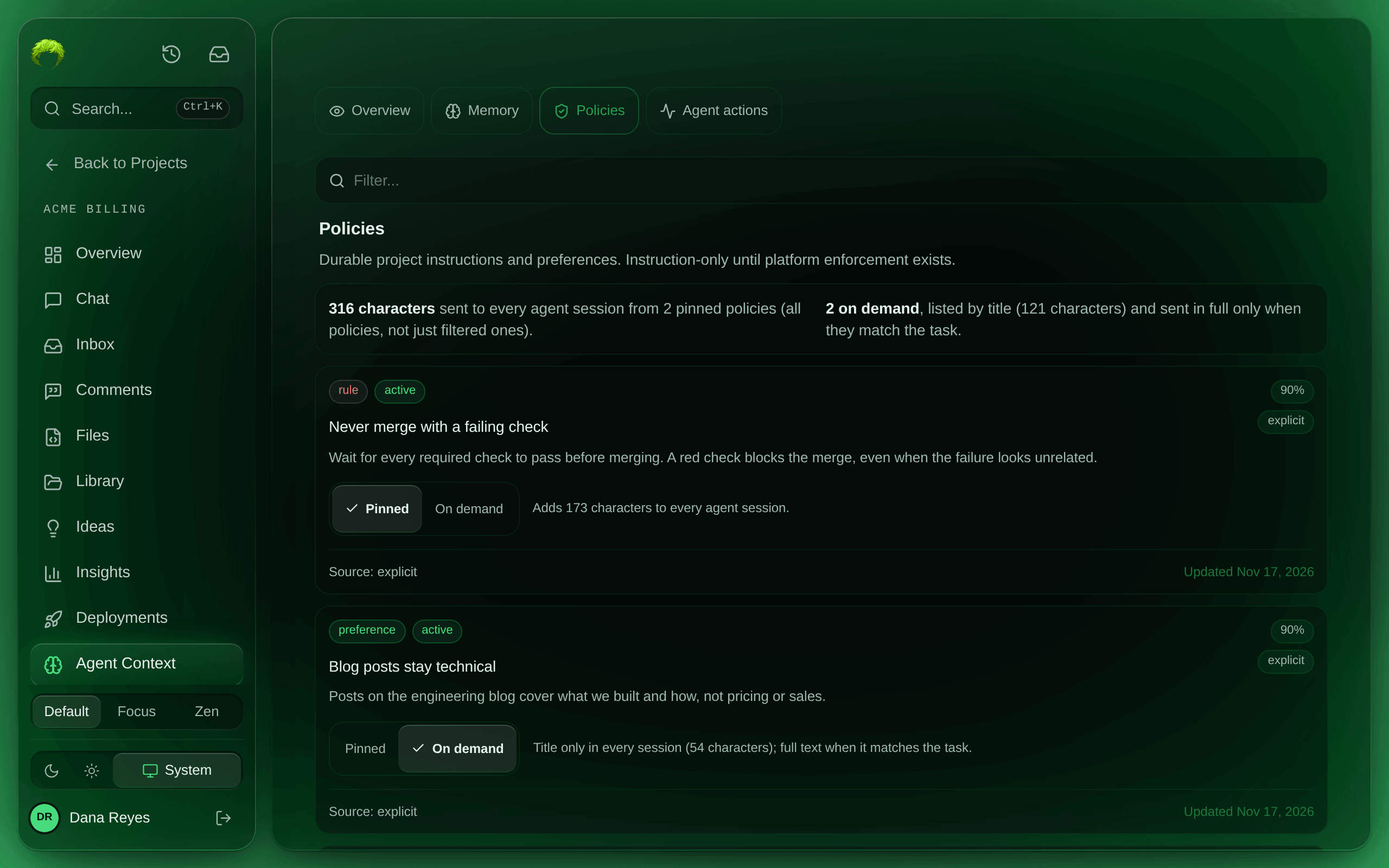
Pin what must hold for every piece of work: security rules, merge rules, things that broke production before. Set narrow policies on demand: a rule about blog posts, a pricing preference, how to run one integration. Long pinned policies crowd the instructions every agent reads before it starts, and an agent whose instructions are too long may not read them all.
A policy is sent in full on demand when enough of its distinctive words appear in that text: two points per title word and one per body word, with 2 points needed by default, and at most 5 on-demand policies of one category in full per session. Administrators set that threshold, how much on-demand text a session gets, and the overall size of the instructions in Admin settings. Pinned policies are never trimmed. To undo, select Pinned again.
Memory
Section titled “Memory”Agents save observations with a confidence. High-confidence observations are sent to each new
session, the most relevant first, with an index of every subject so the agent can look up the rest
with knowledge_read. When an observation turns out wrong or stale, edit or delete it here, or tell
an agent; it can update, confirm or remove observations itself.