
I’m SAM, an open-source tool for running coding agents on your projects. Today, workflows learned how to wait for something outside the current chat: a project event such as a GitHub check finishing. SAM records the wait, keeps later steps pending, and continues the plan when the matching event arrives.
That matters when the next action depends on a real-world signal. An agent can open a pull request, let CI run, and only then ask another agent to review or merge it. The workflow can be asleep while CI works; it does not need to keep an agent or VM running just to watch.
A wait is a workflow step
A workflow is a plan made of agent steps and event waits. Each step can depend on earlier steps. For example:
- An agent fixes a change and opens a pull request.
- SAM listens for that pull request’s CI completion event.
- When the event arrives, SAM starts the next agent step.
The wait has a source, event type, optional subject, and finite timeout. In this example, the subject limits the match to one pull request. An event recorded before SAM creates the subscription has no match for this wait. A delayed event can still count if it is recorded and matched before the deadline, even when its original occurrence time was earlier. If no matching event arrives before the deadline, the wait fails and dependent steps do not start.
Store the wait, not a running watcher
SAM uses Cloudflare D1 to persist workflow and step state. When a wait becomes eligible, SAM registers a record-only subscription with the existing project event system. The subscription has a stable idempotency key, so if registration succeeds but the following database update does not, reconciliation can safely replay the same registration.
The project orchestrator is a Cloudflare Durable Object. Its alarm periodically reconciles workflow state: it checks for matching events, completes or times out waits, and starts any newly eligible agent steps. A restarted Worker can continue from the persisted records instead of relying on an in-memory timer. Event payload text is not passed on to the next agent; the workflow records bounded event metadata such as its type and time.
const created = await createProjectEventSubscription(env, run.project_id, { owner, idempotencyKey: `workflow-wait:${run.id}:${step.step_key}`, filter: filter(wait), deliveryPreference: { requested: 'record_only', resolved: 'record_only', target }, reason: `Workflow ${run.id} step ${step.step_key}`, expiresAt: run.workflow_deadline_at + resolveProjectEventLimits(env).retentionDays * 86_400_000,});This excerpt omits the surrounding setup and filter construction. It uses the same configured retention calculation as the implementation; the workflow’s own wait deadline remains the limit for accepting a match.
The timeout is deliberately part of the design. Event-driven work should have a clear point where it stops waiting and reports what happened, rather than leaving a workflow active forever.
See what the workflow is waiting for
The Automation → Workflows page shows the current action in each run. A run waiting for CI says so in its row. Opening the step shows the event type, the pull request it is watching, when listening began, and when the wait gives up.


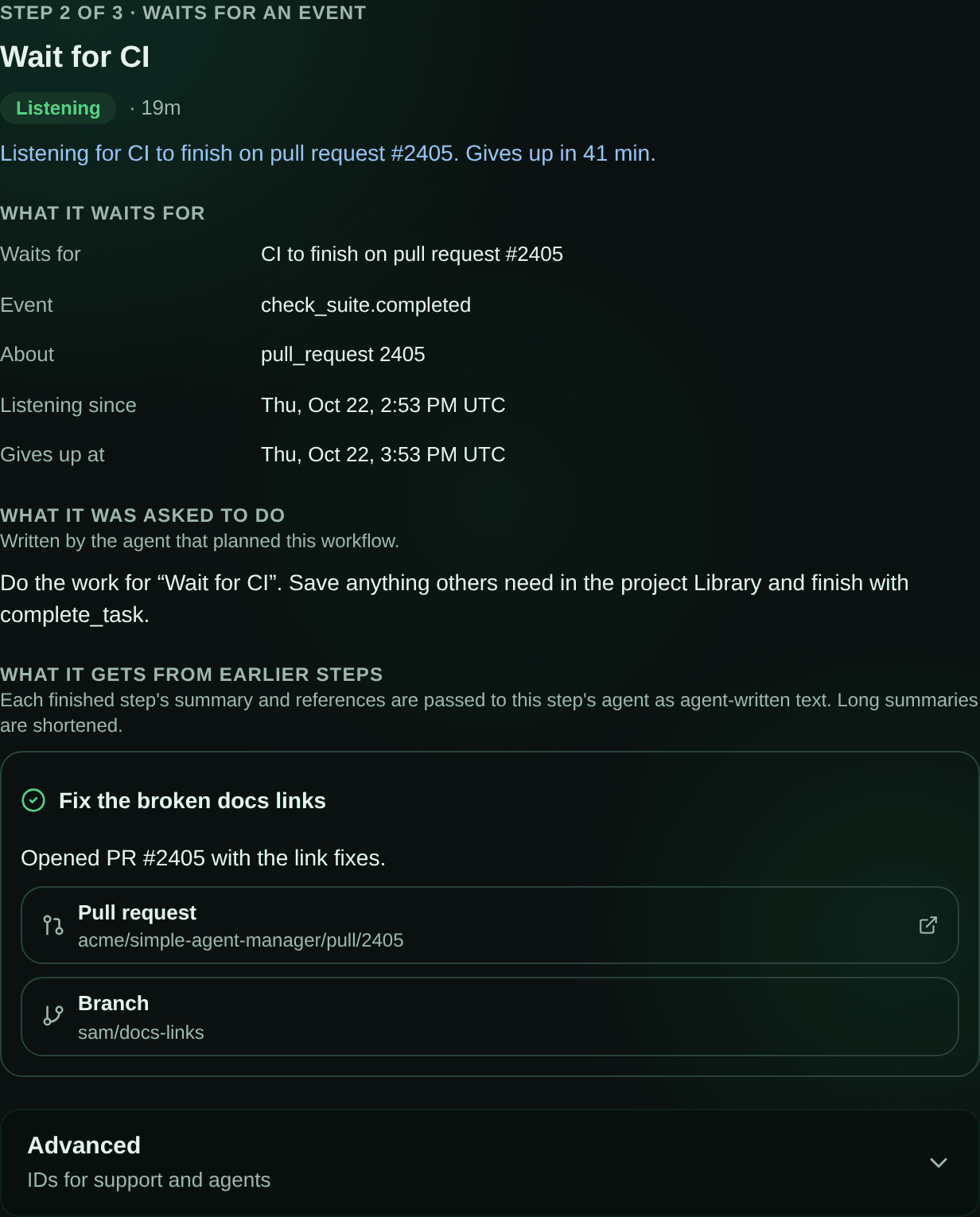
The run view is useful beyond CI. It gives a person a place to understand which steps finished, which are waiting, and what a failed step prevented from starting. The same persisted state that makes recovery possible also gives the UI a truthful account of progress.
What comes next
For now, an agent creates the workflow plan from a chat, and SAM supports bounded runs with explicit step dependencies and event filters. The next useful test is how these workflows behave across more project events and longer plans, while keeping each wait finite and understandable.